

Meeting locations
Meeting location options that let clients choose how to meet
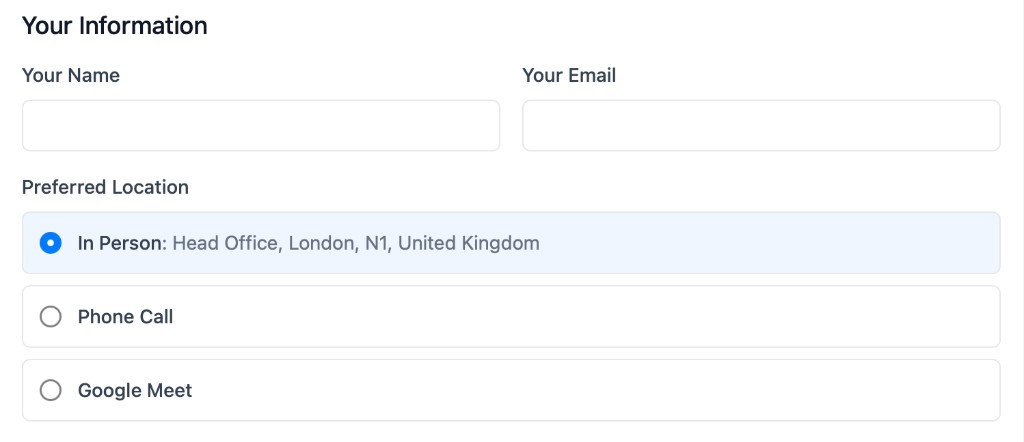
When creating booking pages, you have the option for selecting the location - video call, phone call or meeting in person. Alternatively, let clients choose the location when they book, so one scheduling link covers every format without back-and-forth emails.
The operating problem
Why meeting location options matter for client-facing teams
Most scheduling tools force one location type per booking page. That means teams create separate links for video calls, phone conversations, and office visits — or they handle the format choice manually after the booking is already confirmed.
When clients have different preferences, that extra friction slows down consultations, reviews, and first appointments. Meeting location options keep the decision inside the booking flow, with defaults per event type and the same availability management rules your team already relies on.
How it works
Set defaults, offer choice, and confirm the right format automatically
calendr.so lets you configure meeting location options per event type, so clients see the formats that make sense for that meeting while your team keeps control of the defaults.
Offer multiple formats on one page
Let clients choose between video, phone, and in-person without maintaining separate booking links for every meeting channel.
Set defaults per event type
Pick the right default for demos, reviews, consultations, or site visits while still offering the location options that fit each workflow.
Generate video links automatically
When a client selects a video meeting, Google Meet or Microsoft Teams links can be created as part of the booking confirmation.
Let the attendee choose
Attendee-selected meeting locations put the format decision in the booking flow, so your team does not need to chase replies about how the meeting should happen.
Use cases
Where flexible meeting locations keep bookings moving
Accounting and tax firms
Appointment scheduling for accountants often needs to support office visits for document drop-offs, phone reviews, and video check-ins. One booking flow can cover all three without separate links for each format.
Legal consultations
Law firms can offer in-person meetings at the office, phone calls for quick updates, and video for remote clients — especially when paired with booking forms to collect matter details before the meeting.
Property and field appointments
Real estate teams can set in-person as the default for viewings while still offering phone or video for follow-ups, so location choice stays clear from the first booking step.
Works with calendr.so
Meeting location options fit alongside the rest of the scheduling workflow
Pair location options with branded booking pages so clients see a professional booking experience whether they choose video, phone, or an office visit.
For meetings that need more than one internal person, location settings work with multi-host booking. When video links should reflect the host's connected calendar, calendar sync keeps Google and Microsoft calendars aligned with confirmed bookings.
See how meeting locations fit with other confirmed capabilities on the features overview. When admins need consistent setup across the team, team management helps roll out the same location options on every booking page the firm shares with clients.
Frequently asked questions
- Can clients choose video, phone, or in-person meetings?
- Yes. calendr.so meeting location options let attendees choose the format that fits the conversation, including Google Meet, Microsoft Teams, phone calls, and in-person meetings.
- Can we set a default location per event type?
- Yes. You can set defaults for each event type while still offering the meeting location options that make sense for that workflow.
- Are video conference links generated automatically?
- Yes. When a client selects a video meeting, calendr.so can generate Google Meet or Microsoft Teams links automatically as part of the booking confirmation.
- Can attendees choose their preferred location during booking?
- Yes. Attendee-selected meeting locations let the person booking pick the format that works best — for example, an office visit, a phone call, or a video meeting — without the team handling that choice manually.
- Which video platforms does calendr.so support?
- calendr.so supports Google Meet and Microsoft Teams for video meetings. Phone and in-person locations are also available in the same booking flow.
- Do I need separate booking pages for each meeting format?
- No. One booking page can offer multiple location options, with sensible defaults per event type, so you do not need to maintain separate links for video, phone, and in-person meetings.
Offer video, phone, and in-person meetings from one booking page
Set meeting location options in calendr.so so clients choose the format that fits — without separate links or manual follow-up.
No credit card required