

Multi-host booking
Multi-host booking pages that check every required calendar
Multi-host booking pages let clients choose a time that works for every required host, so sales calls, handoffs, and client reviews do not turn into manual calendar checks.
The operating problem
Why multi-host booking matters for growing teams
Many meetings need more than one person from your side — a sales rep and solutions engineer, customer success and product, a partner and associate. Sending a link that only checks one calendar creates a familiar failure mode: the client books, someone else is unavailable, and the team spends the next day rescheduling.
Email threads and shared inbox coordination do not scale either. Calendar sync helps, but only if the booking page itself checks every required host before a time is offered.
How it works
Show clients only the times that work for the full group
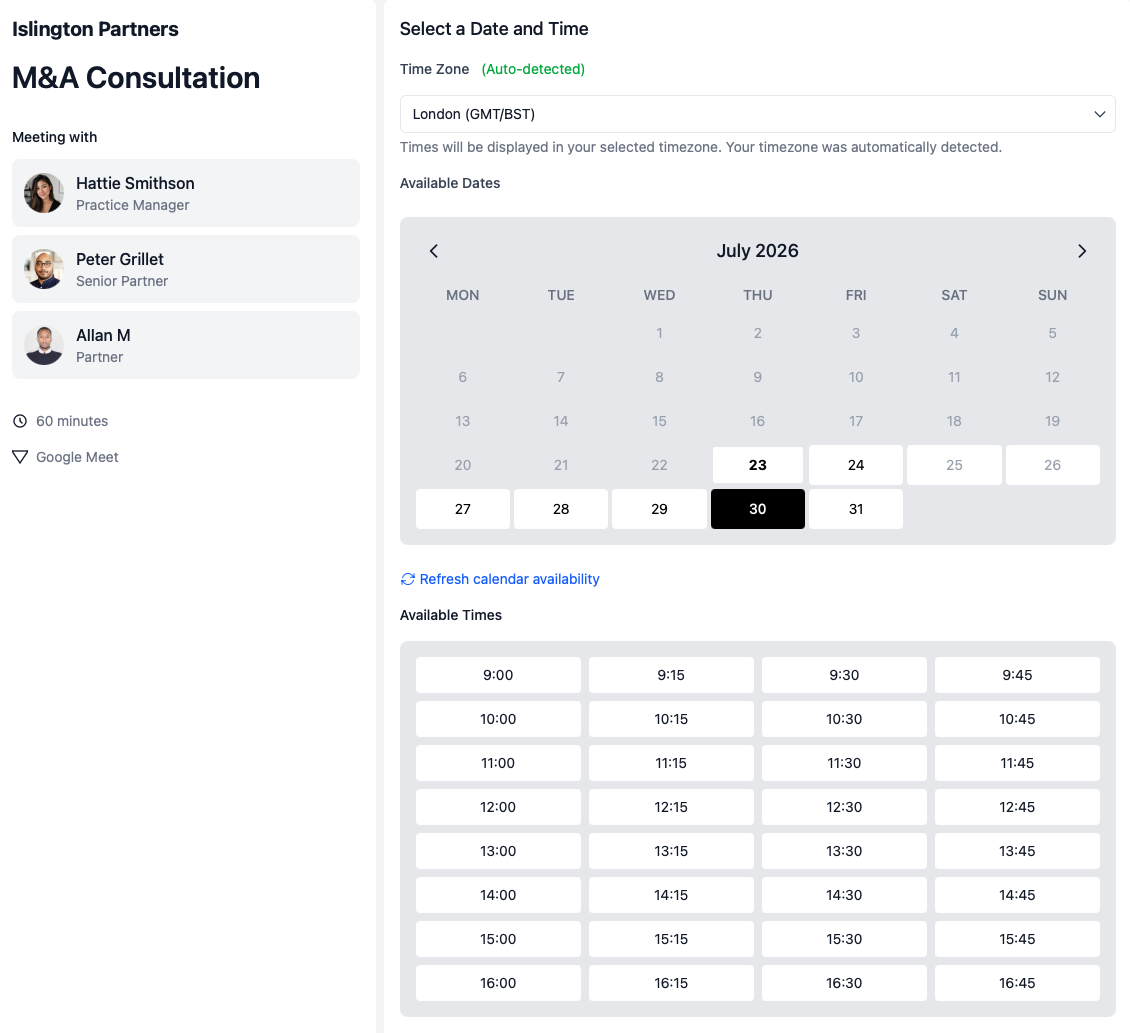
calendr.so multi-host booking pages bring the required internal people into one booking flow, then surface slots where everyone included on the page is actually available.
Required hosts on one page
Build a booking page for meetings that need multiple internal attendees, not separate links for each person.
Shared availability check
Clients see appointment slots only when every required host is free, which cuts down on post-booking reschedules.
Clearer meeting setup
Set expectations upfront about who will attend, so handoffs and reviews start with the right people in the room.
Less calendar admin
Stop comparing calendars manually for meetings that should have been bookable from one link in the first place.
Use cases
Where multi-host booking removes the back-and-forth
Sales and demo calls
Sales teams often need more than one person on discovery calls, demos, and late-stage reviews. Multi-host booking keeps those meetings bookable without juggling separate calendar links.
Sales-to-CS handoffs
Customer success teams use multi-host booking for kickoff and handoff calls where sales context matters and the CS owner needs to be on the call from the start.
Partner-led client meetings
For appointment scheduling for accountants and other client-facing firms, multi-host booking helps when a partner, manager, and specialist all need to be available before the client confirms a time.
Works with calendr.so
Multi-host booking fits alongside the rest of the scheduling workflow
Pair multi-host pages with booking forms when the team needs qualification details before everyone commits to the slot, or with availability management when different meeting types need tighter booking windows.
Use round robin scheduling when any available rep can take the meeting, and multi-host booking when a specific group must attend together. For onboarding flows that need more than one internal owner, multi-host booking also pairs well with client onboarding scheduling.
See how multi-host booking fits with other confirmed capabilities on the features overview. When the original host drops out, fallback scheduling options can keep the client moving instead of leaving them at a dead end.
Frequently asked questions
- What is multi-host booking?
- Multi-host booking lets clients schedule meetings that need more than one internal person. calendr.so shows times only when every required host is free, instead of checking one calendar and fixing conflicts later.
- Can clients book only when every required host is free?
- Yes. Multi-host booking pages check availability across every required person on the meeting, so clients choose from slots that actually work for the full group.
- When should teams use multi-host booking instead of round robin?
- Use multi-host booking when a specific set of people must attend the same meeting. Use round robin scheduling when any available team member can take the booking and the goal is fair distribution.
- Can multi-host booking include more than two people?
- Yes. Multi-host booking pages are built for meetings that need multiple internal attendees, such as sales plus customer success, a partner plus an associate, or a manager plus a specialist.
- Does multi-host booking work with connected calendars?
- Yes. When calendars are connected through calendar sync, multi-host availability can reflect real commitments across the hosts included on the booking page.
Let clients book meetings with every required person included
Create multi-host booking pages that check every required calendar, so handoffs, demos, and client reviews start with the right people in the room.
No credit card required