

For sales teams
Sales Scheduling Software for Teams That Need More Than One Booking Link
Sales scheduling software should do more than let one rep share a calendar link. For a growing team, it should help route inbound leads, book discovery calls, schedule demos, include specialists when needed, collect context before the call, and show leaders what is actually being booked.
calendr.so helps SDRs, AEs, founders, and sales leaders turn interest into the right booked conversation with team event types, round robin scheduling, qualifying forms, multi-host booking, and booking reports.
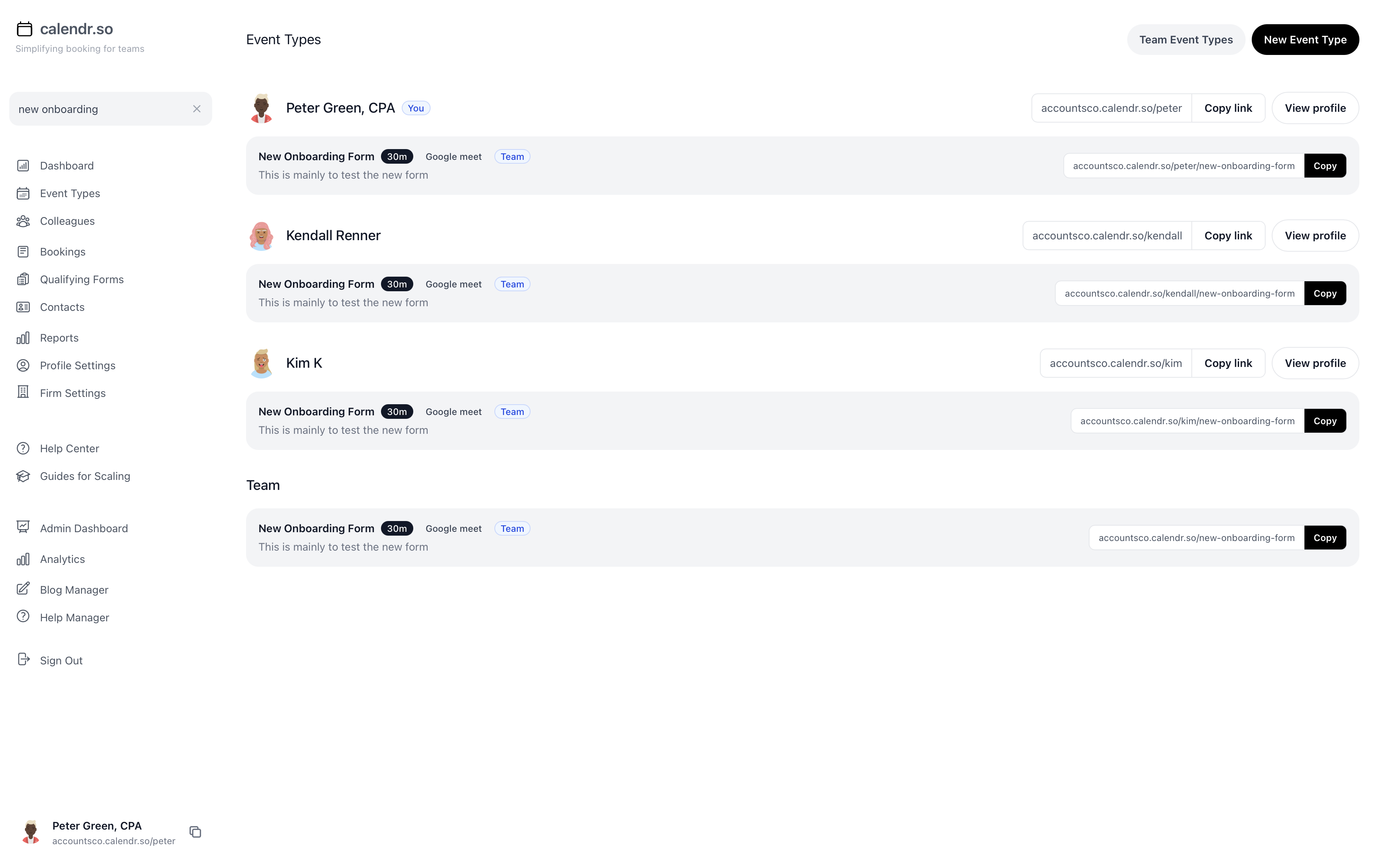
What is sales scheduling software?
Sales scheduling software helps sales teams book meetings with prospects and customers without manually checking calendars, assigning reps, collecting basic context, or rebuilding the same booking process for every lead.
For solo sellers, that might mean a simple booking link. For a team, it usually needs more: round robin routing, discovery call pages, demo booking pages, qualification questions, multi-host availability, calendar sync, and reporting.
When a basic booking link stops working for sales teams
A personal scheduling link is enough for one seller. It usually breaks down once the team grows and inbound volume, routing rules, and manager visibility all matter.
- — Every rep using a different event type
- — Leads being manually assigned
- — Poor-fit prospects booking senior sellers
- — Demos needing multiple internal people
- — Managers lacking visibility into bookings, cancellations, and reschedules
- — Old links remaining active when a rep leaves
calendr.so is built for team-controlled workflows — not just another link. Fallback options keep team booking pages working when reps change roles or leave, and booking forms help route prospects before they reach the wrong calendar.
For sales leaders
See what your sales team is actually booking
Sales leaders want to know which reps are getting booked, which event types are creating meetings, whether demo volume is increasing, and whether cancellations or reschedules are rising — without exporting calendars by hand. When UTM data is present, booking reports also help show which campaign or page is generating bookings.
Summary metrics
See meetings booked, cancelled, and rescheduled for the selected period at a glance before you dig into the breakdown.
Flexible timeframes
Switch between this week, this month, last month, all time, or a custom date range when you need a board update or a campaign post-mortem.
Filter as you go
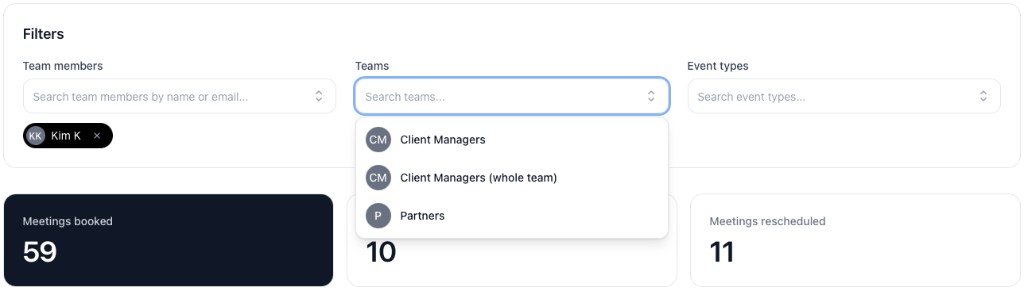
Narrow the report by team members, teams, or event types. Filters apply immediately so the summary, chart, and table stay in sync.
Export and saved views
Download CSV for spreadsheets or leadership updates, and save filter presets when you revisit the same report every week.
Filter by the people and booking pages that matter
Search team members, teams, and event types to focus on one pod, one booking page, or one part of the business. Summary cards update as soon as you add or remove a filter.
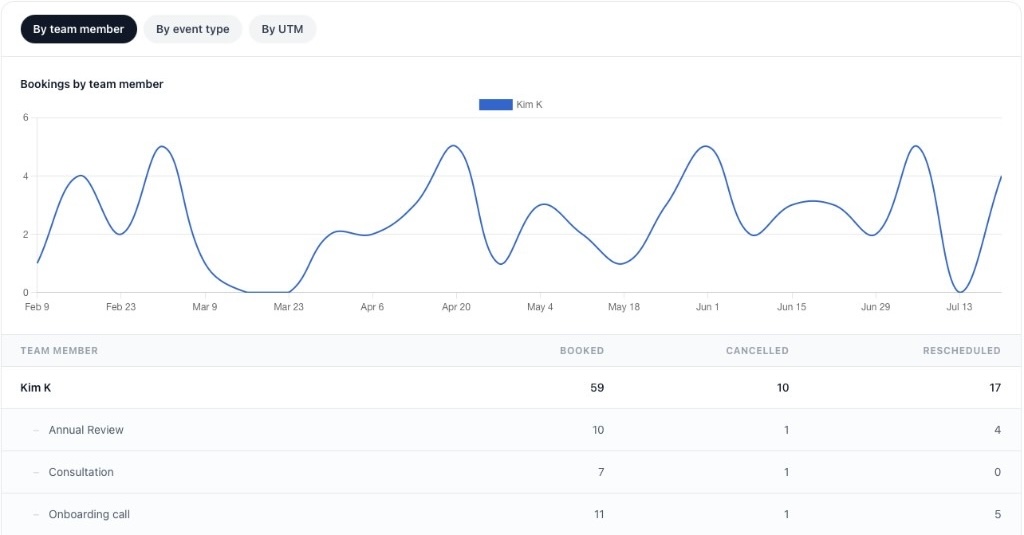
By team member
See each person's booked, cancelled, and rescheduled totals, with event types nested underneath. A line chart shows how their booking volume changes over the selected period.
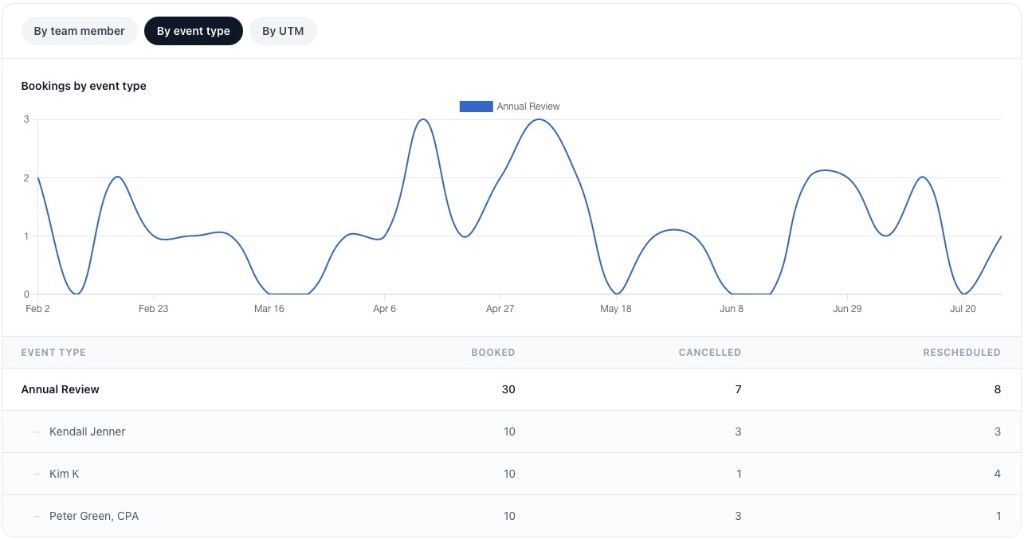
By event type
Flip to event type view when the question is about booking pages rather than people — for example, which discovery links or demo calls are generating meetings, and which hosts are attached to each one.
Sales workflows
How growing sales teams set up discovery, demo, handoff, and follow-up booking
Sales appointment scheduling software should match how your team actually sells — not just list features. Each workflow below covers what breaks manually, which calendr.so capability supports it, and what prospects and sales leaders get from the setup.
Inbound lead booking
Route inbound leads before interest goes cold
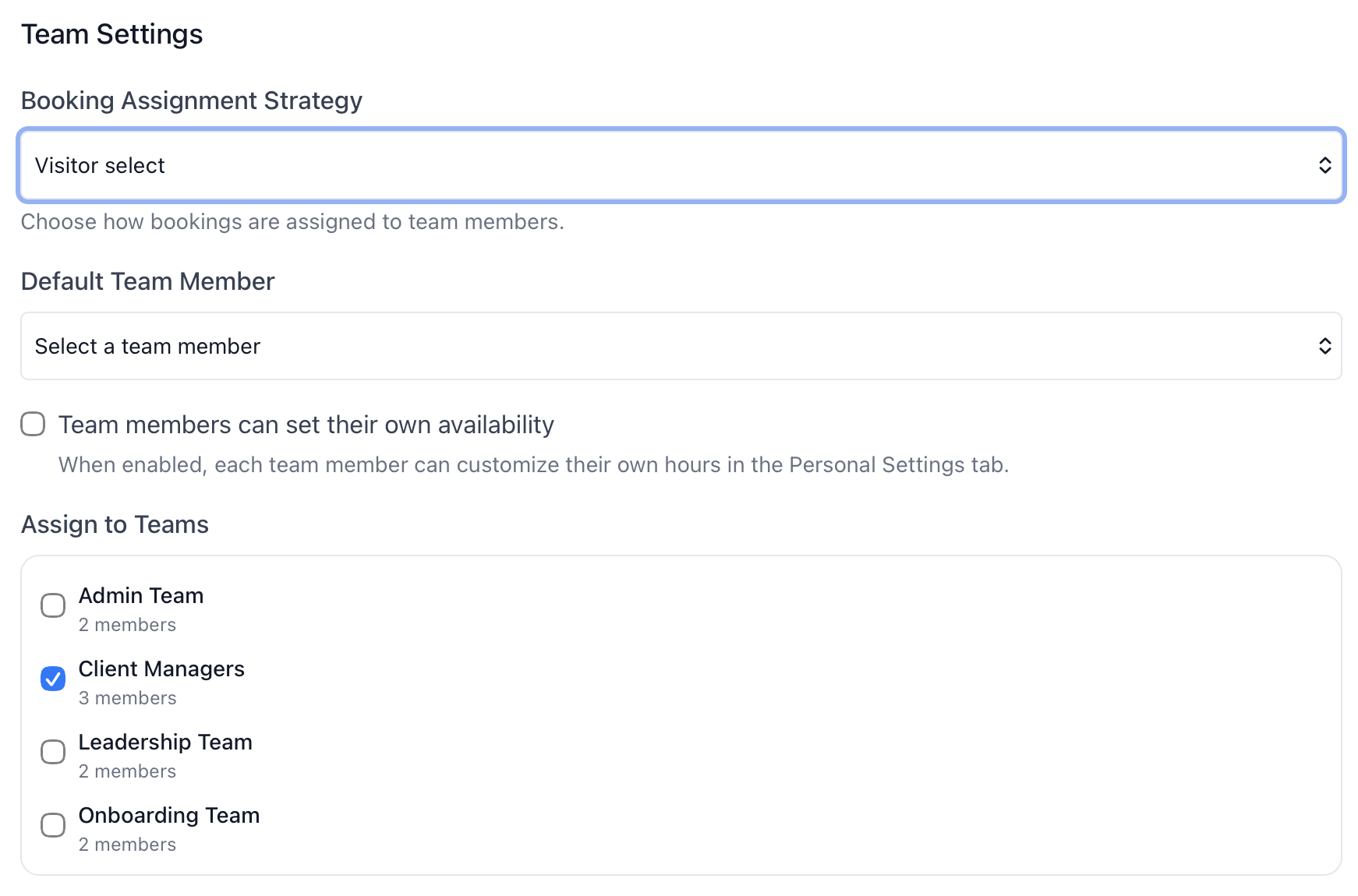
Manually assigning inbound leads slows speed-to-lead and overloads one rep while others have open calendar space. Round robin scheduling distributes website and campaign leads across available sellers automatically.
- What the prospect experiences.
- They book the first conversation immediately with an available rep — no waiting for manual assignment.
- What sales leaders control.
- Team event types standardise inbound pages, routing rules, and reporting on which booking flows are generating meetings.
SDR discovery calls
Qualify and route prospects before the discovery call
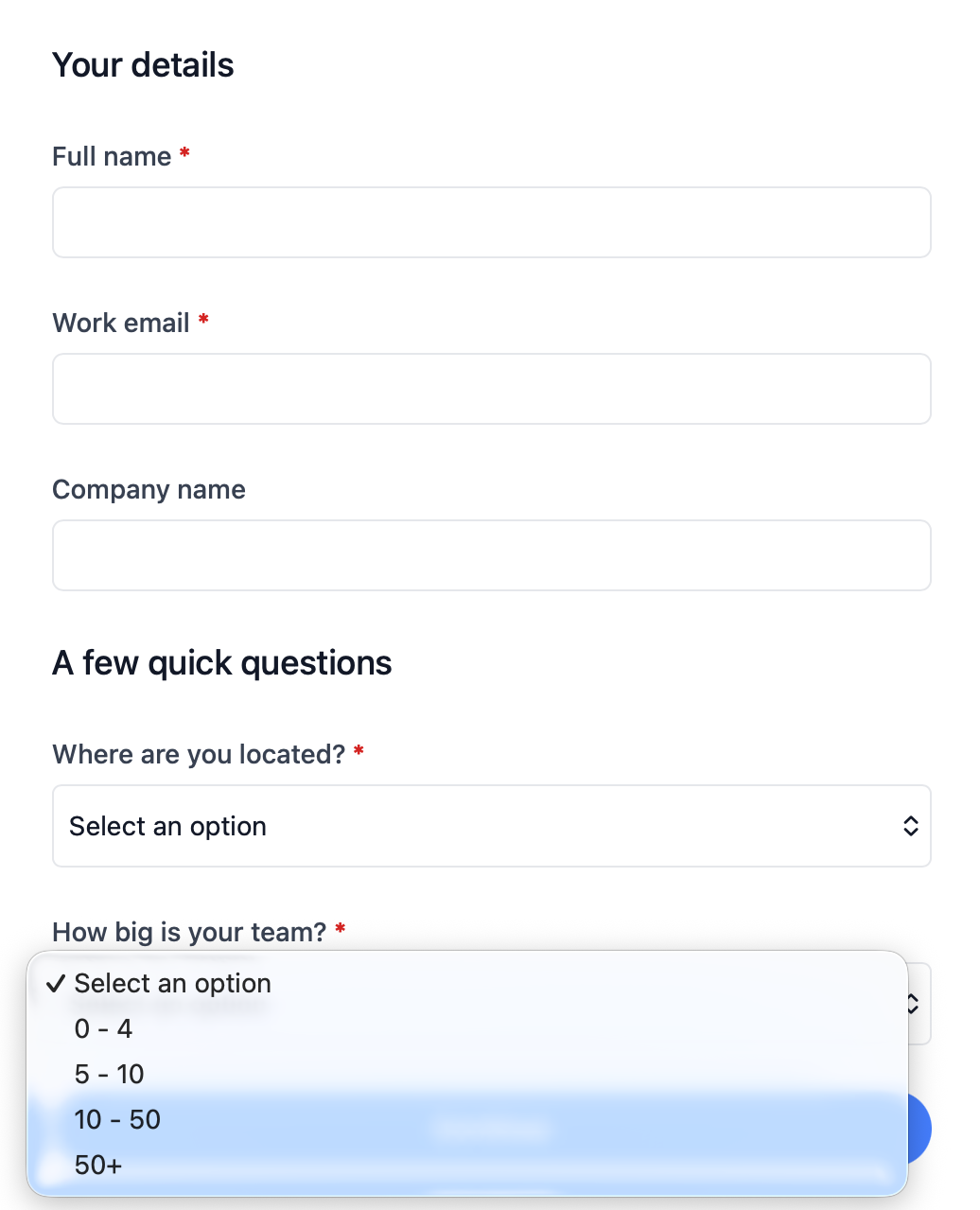
When every SDR uses a different link and qualification happens on the call, reps lose time on basic discovery questions. Qualifying forms and discovery call scheduling pages collect context upfront and send each prospect to the right next step.
- Route by fit, urgency, or segment.
- Use Qualifying Forms to route prospects before they book to send high-intent leads to the right discovery page and poor-fit prospects elsewhere.
- Gather CRM-adjacent details upfront.
- Collect company, role, use case, and urgency before the meeting so reps show up prepared and CRM notes start stronger.
- Send poor-fit prospects elsewhere.
- Route prospects who are not ready to book to a custom message or external resource instead of filling rep calendars with low-intent calls.
Demo scheduling
Book demos through a dedicated flow, not a generic calendar link
Demo requests often need an AE and SE, a product specialist, or a qualification step before the meeting is confirmed. That is a narrower workflow than general sales scheduling — see sales demo scheduling for how teams set up demo pages, specialist routing, and embedded booking on pricing or product pages.
- What the prospect experiences.
- They book a demo through a page built for mid-funnel product conversations — not a generic personal link.
- What sales leaders control.
- Demo volume tracked separately from discovery in booking reports, with routing rules for specialists and regional teams.
Specialist or AE + SE calls
Include every required seller without the back-and-forth
Many calls need more than one seller involved. calendr.so shows prospects only the times when every required host is free — whether that is an AE and SE for a product demo or an AE and manager for a late-stage conversation.
- Include every required seller.
- Use Multi-host Booking Pages when AE, SDR, SE, or manager availability all need to be checked at once.
- Share booking links in outbound sequences.
- Embed scheduling in one-to-one emails, signatures, and campaigns so prospects can book without reply lag.
- Reduce stalled opportunities.
- Quickly search for team member's booking pages across the business to ensure no opportunities are missed.
Sales-to-CS handoffs
Book handoff meetings with both teams in the room
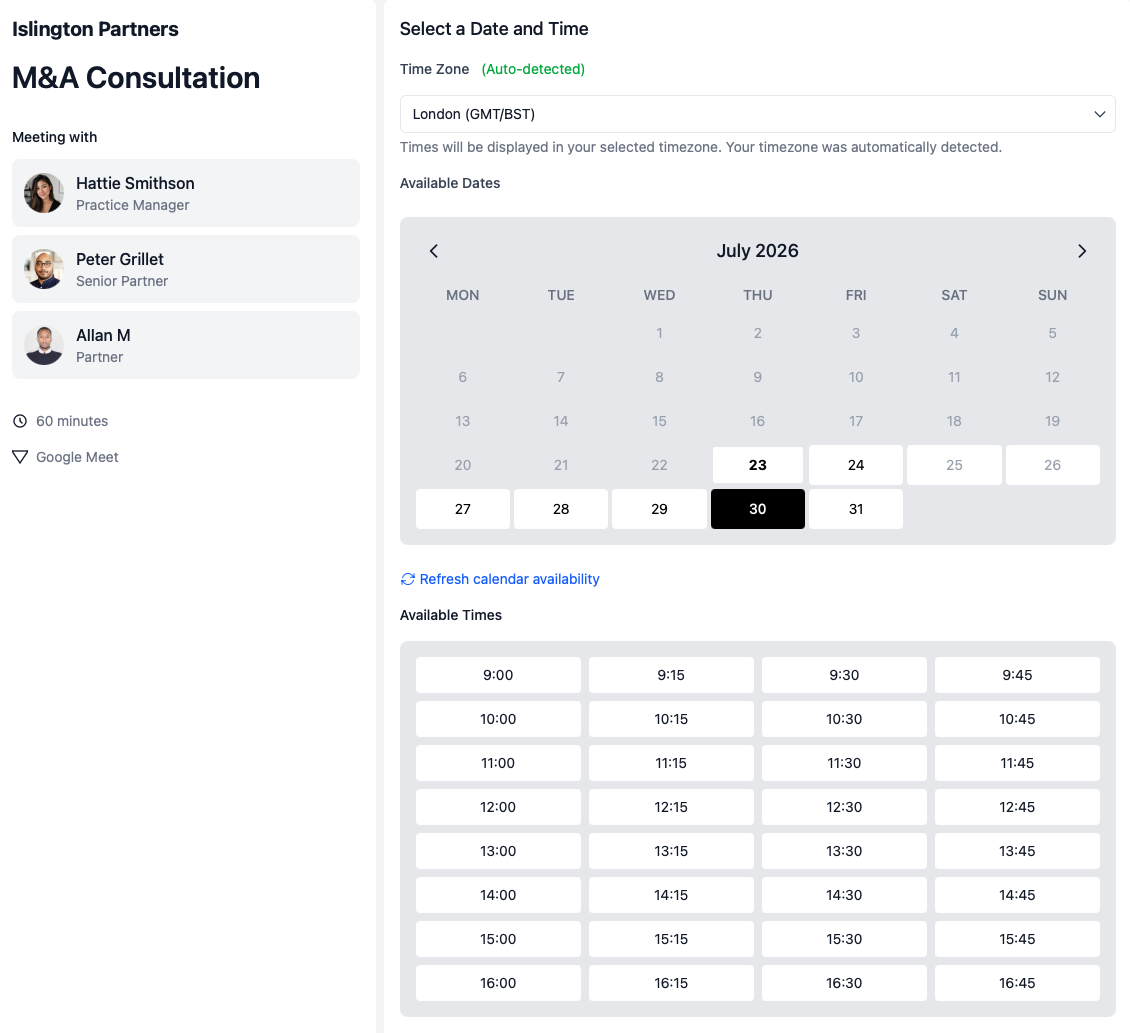
Handoff meetings booked ad hoc lose context between sales and customer success. Team event types and multi-host booking let prospects schedule with both AE and CSM when the deal is ready to transition — keeping customer success scheduling aligned with how the sale closed.
- What the prospect experiences.
- They book a handoff call with every required person available — not a chain of separate scheduling emails.
- What sales leaders control.
- Standardised handoff meeting types with consistent intake and visibility in booking reports.
Product demos
For product demos, use a dedicated demo booking flow
Demo scheduling is a narrower workflow than general sales meeting scheduling. Teams often need an AE and SE on the same call, a product specialist in the rotation, a qualification form before the meeting is confirmed, or an embedded booking page on a pricing or product page.
See how calendr.so handles sales demo scheduling — including multi-host demos, specialist routing, and high-intent page embedding.
Six sales scheduling workflows at a glance
Each workflow maps a common sales scheduling problem to the calendr.so feature that solves it.
Inbound lead booking
- What breaks manually
- Leads sit in a shared inbox while one rep gets overloaded, or managers manually assign every request.
- Calendr feature
- Round robin scheduling and team event types
SDR discovery calls
- What breaks manually
- Every SDR uses a different link and qualification happens on the call instead of before it.
- Calendr feature
- Qualifying forms and standardised discovery pages
Demo scheduling
- What breaks manually
- Demo requests need manual assignment and the wrong seller often gets booked.
- Calendr feature
- Dedicated demo event types with routing and qualification
Specialist or AE + SE calls
- What breaks manually
- Multi-person availability is checked in separate email threads.
- Calendr feature
- Multi-host booking
Sales-to-CS handoffs
- What breaks manually
- Handoff meetings are booked ad hoc and context is lost between teams.
- Calendr feature
- Multi-host booking and team event types for handoff pages
Reporting and sales management
- What breaks manually
- Managers export calendars by hand and cannot see team-wide booking trends.
- Calendr feature
- Booking reports
How to setup
Get set up in less than 3 minutes
This short walkthrough shows how quickly a sales team can get calendr.so working for inbound and outbound booking.
In the video, you will see:
- How to set up a new account
- How to create a discovery call or demo meeting type
- How to share a booking link with prospects
- How to invite SDRs, AEs, and managers
Team management
Built for growing sales teams
As teams scale, scheduling cannot depend on one rep remembering to send a link or a manager manually reassigning meetings when someone leaves. calendr.so gives sales leaders the ability to standardise meeting types while each rep keeps control of their own calendar — with fallback options when reps change roles or leave.
- Team event types
- Standardise discovery, demo, follow-up, and handoff meetings across reps so messaging stays consistent.
- Forms before booking
- Use Booking Forms to collect data before every meeting to collect qualification details ahead of the call so reps show up prepared and CRM notes start stronger.
- Round robin and fallback options
- Distribute inbound meetings with Round Robin Scheduling to distribute bookings automatically and keep team booking pages working when reps change roles or leave.
- Multi-host discovery and demos
- Include AEs, SEs, SDRs, or managers when needed using Multi-host Booking Pages, instead of juggling separate calendar links.
- Embeddable booking links
- Add scheduling to outbound emails, landing pages, and high-intent website pages so prospects can book without reply lag.
- Rep availability controls
- Protect focus time with buffers, working hours, and meeting-specific rules while still offering clear booking windows.
What people are saying
Trusted by sales leaders, CSMs, accountants and consultants rolling out team scheduling
From team event types and booking forms to round robin, multi-host meetings, and reporting — teams across sales, professional services, and client-facing businesses use calendr.so to save time as they grow.
"Team event types let us standardise client consultation and review meetings across the firm — so partners and managers share the same professional booking experience without everyone maintaining their own links."

"I embed calendr.so booking links straight into landing pages and outreach — prospects pick a time without email ping-pong, and I keep control of when I'm actually available."

"calendr.so makes it easy for customers to book with the right CSM or sales person — round robin and shared team pages mean handovers happen without chasing links or waiting on replies."

"Booking forms on our consultation pages collect the briefing details we need before a call — clients book in one step and our team shows up prepared instead of spending the first ten minutes on basics."

"Booking reports give me a firm-wide view of what is actually being scheduled — by person and meeting type — without exporting calendars. That's the oversight a growing team needs."

"We rolled calendr.so out quickly — Google Calendar sync, team booking pages, and multi-host meetings worked out of the box without a heavy IT project or custom integration."

"Standardising our meeting types and having booking reports in one place has dramatically saved time. We spend less time coordinating calendars and more time in conversations that matter."

"Standardising how we book and having clear reporting has let our sales team scale faster — we didn't need more admin to handle more reps."

"I've installed calendr.so with several sales teams because it's easy to deploy, and the reporting gives marketing real visibility into which campaigns are turning into booked meetings."

"Our clients and our team both love it — it saves time in the booking process and gets rid of the back-and-forth."

"Multi-host booking pages mean clients can schedule workshops when every facilitator is free — one link, no internal calendar coordination, and a smoother experience for everyone."

"You don't need to be technical to get calendr.so working. We had booking pages set up and shared with the team quickly — without IT or a long implementation project."

Sharon De'Athe, CPA, CGA
Partner at WL Buck

Frequently asked questions
- What is sales scheduling software?
- Sales scheduling software helps sales teams book meetings with prospects and customers without manually checking calendars, assigning reps, collecting basic context, or rebuilding the same booking process for every lead. For solo sellers, that might mean a simple booking link. For a team, it usually needs round robin routing, discovery and demo pages, qualification questions, multi-host availability, calendar sync, and reporting.
- How is sales scheduling software different from a normal booking link?
- A basic booking link works for one seller sharing personal availability. Sales scheduling software adds team-controlled workflows: standardised event types, automatic lead routing, qualification before booking, multi-host coordination, fallback when reps leave, and reporting on booked, cancelled, and rescheduled meetings across the team.
- Can sales teams route leads automatically?
- Yes. Round robin scheduling distributes inbound leads across available SDRs or AEs so speed-to-lead does not depend on one person's calendar or a manual assignment step.
- Can a demo include more than one seller?
- Yes. Multi-host booking lets prospects schedule demos only when every required seller — such as an AE and SE — is available, so product conversations do not need to be rebooked because one host was missing.
- Can prospects answer qualification questions before booking?
- Yes. Booking forms and qualifying forms collect company, role, use case, and urgency before the meeting is confirmed, so reps enter calls prepared and poor-fit prospects can be routed elsewhere.
- Can sales leaders report on booked, cancelled, and rescheduled meetings?
- Yes. Booking reports show meeting volume by team member and event type, with filters for timeframes, teams, and booking pages. Leaders can export CSV and save filter presets for recurring reviews.
- Can Calendr support SDR and AE teams?
- Yes. calendr.so supports SDR discovery routing, AE demo booking, multi-host calls with specialists, team event types shared across reps, and the reporting sales leaders need as the team grows.
Book more sales meetings with less admin
Create sales scheduling workflows for inbound leads, discovery calls, demo handoffs, and team reporting.
No credit card required
Blog
More ways calendr.so can help client-facing teams

Google Calendar Appointment Schedule vs a Proper Booking Tool
Google Calendar Appointment Schedule is a useful option when one person needs a simple booking page. It starts to feel limited when a growing team needs consistent meeting types, multi-person availability, lead routing, controlled booking links, and reporting that goes beyond checking individual calendars.

How Event Types Make Interview Scheduling Easier for Hiring Teams
Interview scheduling gets messy when every stage is treated like the same calendar link. This video shows how different event types can help hiring teams manage screening calls, hiring manager interviews, final interviews, required hosts, fallback options, and ad hoc meetings without rebuilding the process in email every time.

Appointment Scheduling Software for Client-Facing Teams: A Calendr.so Overview
If your team books sales calls, onboarding sessions, support reviews, legal appointments, or client consultations, a basic booking link can start to create more admin than it removes. This video walkthrough shows how calendr.so helps client-facing teams control meeting types, find the right colleague's link, coordinate multi-person meetings, and report on booking activity without turning scheduling into another spreadsheet.
Share this with the decision maker
Need a head of sales, RevOps lead, or sales manager to take a look?
Sales leaders often spot the scheduling problem before they own the buying decision. Use the button to open an email with a short note and a link to this page.
Share this page