

Availability management
Availability management that protects focus time and client access
Availability management helps teams decide when each meeting type should be bookable, set working hours and buffers at the profile or booking-page level, and stop clients from booking unrealistic appointment slots.
The operating problem
Why availability management matters for growing teams
When every booking link shows the same open calendar, appointment scheduling starts eating into focus time, prep blocks, and the hours that should stay protected for client work. Teams end up manually moving meetings, apologising for awkward slots, or turning booking off altogether.
Sharing one generic link does not solve it either. A 15-minute check-in, a sales demo, and a multi-person handoff need different rules — and calendar sync only helps if availability settings reflect how the team actually works.
How it works
Set availability where the booking decision actually happens
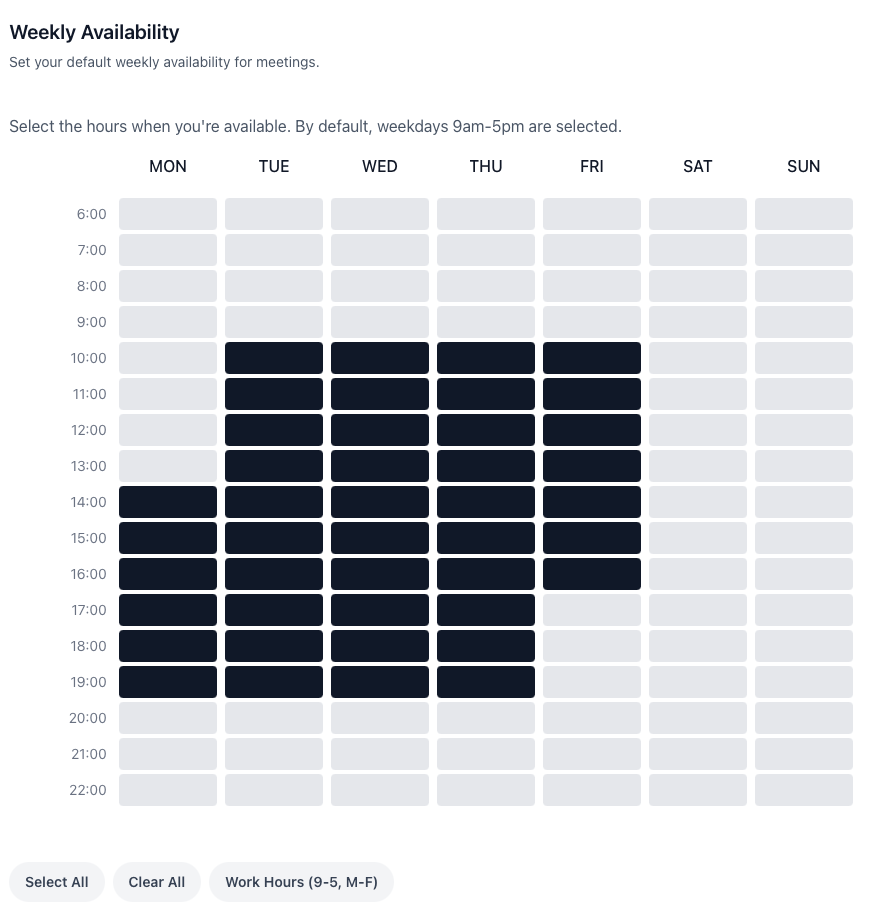
calendr.so lets teams control availability at profile level and on individual booking pages, so the rules match the meeting — not just the person.
Profile and page-level hours
Choose available days and times on profile pages and on specific booking pages when different meeting types need different windows.
Booking-window controls
Prevent meetings within a set number of hours and stop bookings too far ahead, so clients cannot grab slots the team is not ready for.
Buffers between appointments
Add breathing room between meetings so back-to-back bookings do not erase prep time, travel, or note-taking.
Connected calendar protection
Use connected Google and Microsoft calendars to reflect real commitments while still deciding which slots clients can book.
Use cases
Where teams tighten availability without slowing booking down
Sales and demo routing
Keep inbound demos bookable during selling hours, add buffers before discovery calls, and pair tighter windows with round robin scheduling when enquiries need fair distribution.
Customer success and onboarding
Customer success teams often need kickoff and QBR slots available without opening the whole week. Different booking pages can carry different hours for onboarding, training, and check-ins.
Accounting and client-facing firms
During busy seasons, appointment scheduling for accountants needs tighter booking windows and realistic daily capacity — not a calendar that invites back-to-back client meetings all day.
Works with calendr.so
Availability rules are only useful when the rest of the booking flow fits
Pair availability settings with booking forms when the team needs context before a slot is confirmed, or with multi-host booking when every required person needs to be free before a time is offered.
For teams scaling booking standards, team scheduling and admin helps roll out consistent event types while each person keeps control of their own hours. When the original host is unavailable, fallback scheduling options keep the client moving instead of hitting a dead end.
See how availability fits alongside other confirmed capabilities on the features overview, or explore how sales teams use booking windows to protect demo capacity during busy weeks.
Frequently asked questions
- Can availability rules differ by booking page?
- Yes. calendr.so lets teams set availability at profile level and on individual booking pages, so a quick check-in and a longer onboarding call can follow different rules.
- Can we prevent bookings too soon or too far in advance?
- Yes. Booking-window controls let you stop meetings being booked within a set number of hours and limit how far ahead clients can schedule.
- Can we set working hours and buffers for different meeting types?
- Yes. Teams can choose available hours, add buffers between appointments, and tailor availability to the workflow behind each meeting type.
- Do connected calendars affect availability?
- Yes. When calendars are connected through calendar sync, calendr.so can reflect real commitments across work and personal calendars while still showing clients only the slots you want to offer.
- Who usually manages availability settings?
- Individual team members often set their own hours, while admins and ops leads use availability management to keep booking pages consistent as the team grows.
Give clients bookable access without giving up the calendar
Set working hours, buffers, and booking windows once, then let clients book appointment times that actually work for your team.
No credit card required