

Sales demos
Sales Demo Scheduling for Teams That Need More Than a Generic Demo Link
Sales demo scheduling should do more than let one rep share a calendar link. For a growing team, it should help route demo requests, coordinate AE and SE availability, qualify prospects before the call, and embed booking where mid-funnel intent is highest.
calendr.so helps sales teams turn demo interest into the right booked conversation with multi-host booking, round robin scheduling, booking forms, and booking reports — as part of the wider sales scheduling workflow.
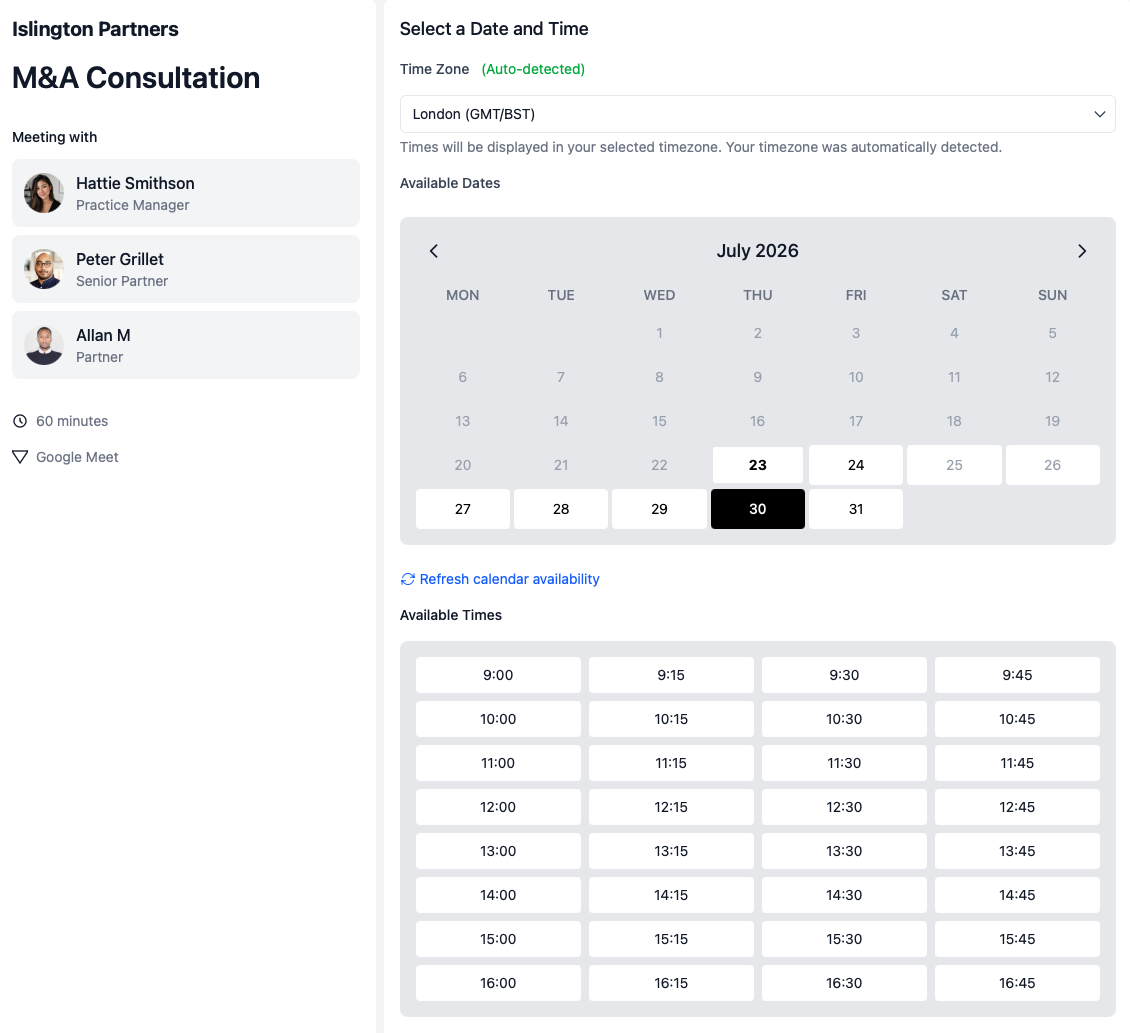
What is sales demo scheduling?
Sales demo scheduling helps teams book product demos with prospects without manually checking calendars, assigning reps, collecting basic context, or rebuilding the same demo flow for every request.
For one seller, a personal booking link may be enough. For a team, demo scheduling usually needs multi-host availability when an AE and SE must attend, round robin routing for specialist teams, qualification questions before booking, embeddable pages on pricing or product sites, and visibility into demo volume in booking reports.
When a basic demo link stops working for sales teams
A personal demo link works for one rep with a simple calendar. It usually breaks once demo requests need routing, multiple sellers, or manager visibility.
- — Demo requests sit in a shared inbox waiting for manual assignment
- — Demos get booked with only one required seller available
- — Poor-fit prospects reach senior sellers or product specialists
- — AE and SE availability is checked in separate email threads
- — Managers cannot see demo volume, cancellations, or reschedules by page
- — Old demo links keep routing to reps who have left the team
calendr.so is built for team-controlled demo workflows. Use qualifying forms to route requests before booking, and fallback options when hosts change or leave.
The operating problem
Why sales demo scheduling matters in the mid-funnel
Demo booking breaks down when prospects have to wait for manual coordination, demos get scheduled with only one required seller available, or the team starts the conversation without basic company context. That creates reschedules, slower pipeline movement, and uneven buyer experiences.
Sales demo scheduling gives qualified prospects one clear next step while your team controls who must attend, what information is collected first, and where booking happens. Instead of juggling separate calendar links, sales teams can run AE and SE demos, specialist routing, and high-intent website booking from defined demo pages.
Demo workflows
How teams route demo requests and book the right sellers
Each workflow below covers what breaks manually, which calendr.so capability supports it, and what prospects and sales leaders get from the setup.
AE and SE product demos
What breaks: Availability checked in separate threads; demos booked without every required host.
Calendr feature: Multi-host booking shows prospects only the slots where the full selling team is free.
Route demo requests automatically
What breaks: Demo requests pile up in a shared inbox while one rep gets overloaded.
Calendr feature: Round robin scheduling and qualifying forms route requests to the right specialist or demo page.
Pricing and product page booking
What breaks: Prospects must email to book after showing high intent on your site.
Calendr feature: Embeddable booking on the pages where prospects are already evaluating the product.
How it works
Coordinate sellers, qualify prospects, and book demos in one flow
calendr.so demo pages combine scheduling, seller coordination, and pre-demo intake so prospects can book immediately while sales keeps control of routing, availability, and meeting setup.
Book AE and SE demos cleanly
Use multi-host booking so prospects only see times when every required seller is free.
Qualify before the demo
Collect company info, use case, and team context with booking forms before the conversation begins.
Route to demo specialists
Distribute demo requests across available reps or regional teams with round robin scheduling.
Embed where intent is highest
Add demo booking to pricing pages, product pages, and campaign landing pages without another email step.
For sales leaders
Track demo volume, not just calendar activity
Sales leaders want to know which reps are getting demo bookings, which demo pages are generating meetings, and whether cancellations or reschedules are rising — without exporting calendars by hand.
Booking reports filter demo event types separately from discovery calls, so managers can see demo volume by rep, page, and timeframe.
Works with calendr.so
Sales demo scheduling fits the wider revenue workflow
Pair demo pages with booking forms when sellers need company context before the call, and with availability management when demo teams need tighter booking windows or calendar protection on shared inbound pages.
For earlier-funnel conversations, discovery call scheduling handles qualification and rep routing before a prospect is ready for a product demo. When demo hosts change or leave the rotation, fallback scheduling options help older demo links keep working.
Demo scheduling is one part of the wider sales scheduling software workflow — including inbound routing, discovery calls, handoffs, and team reporting. See confirmed capabilities on the features overview.
Frequently asked questions
- What is sales demo scheduling?
- Sales demo scheduling helps teams book product demos with prospects without manually coordinating calendars, assigning reps, or rebuilding the same demo booking process for every request. For a growing team, it usually needs routing rules, AE and SE coordination, qualification before booking, specialist rotation, and reporting on demo volume.
- How is sales demo scheduling different from discovery call scheduling?
- Discovery calls are usually earlier in the funnel and often focus on qualification plus rep routing. Demo scheduling more often needs AE and SE pairings, specialist routing, qualification forms, and pages built for mid-funnel product conversations.
- Can an AE and SE share one demo booking page?
- Yes. Multi-host booking lets prospects schedule demos only when both the account executive and sales engineer are available, so product conversations do not need to be rebooked because one seller was missing.
- Can we route demo requests without manual assignment?
- Yes. Round robin scheduling distributes demo requests across available specialists or regional teams, and qualifying forms can route prospects to the right demo page based on fit, segment, or product interest.
- Can we embed demo booking on pricing or product pages?
- Yes. Embeddable booking pages make it easy to add demo scheduling directly to high-intent pages where buyer interest is already strong.
- Can we collect company info before the demo?
- Yes. Booking forms gather company size, use case, team context, and other pre-demo details before the meeting is confirmed, so sellers arrive prepared.
- Can sales leaders report on booked, cancelled, and rescheduled demos?
- Yes. Booking reports show demo volume by team member and event type, so leaders can track which demo pages are working and whether cancellations or reschedules are rising.
- What happens when one demo host becomes unavailable?
- Fallback scheduling options can help keep qualified prospects moving when a host drops out of the rotation or an older demo link needs to keep working after team changes.
Book sales demos with less back-and-forth
Create demo booking pages for AE, SE, and specialist-led conversations with routing rules, qualification, and reporting your team can control.
No credit card required