

For customer success teams
Appointment Scheduling for Customer Success Teams
calendr.so is customer success scheduling software that helps CS teams turn handoffs, onboarding, training, check-ins, and renewals into a consistent, reportable customer meeting journey — without spreadsheet workarounds or another heavy platform.
Team Event Types · Booking Forms · Multi-host Booking · Booking Reports · Fallback Options
Cleaner sales-to-CS handoffs
Get the right people into the right customer handoff without back-and-forth between sales, CS, implementation, founders, and product.
One update, whole team
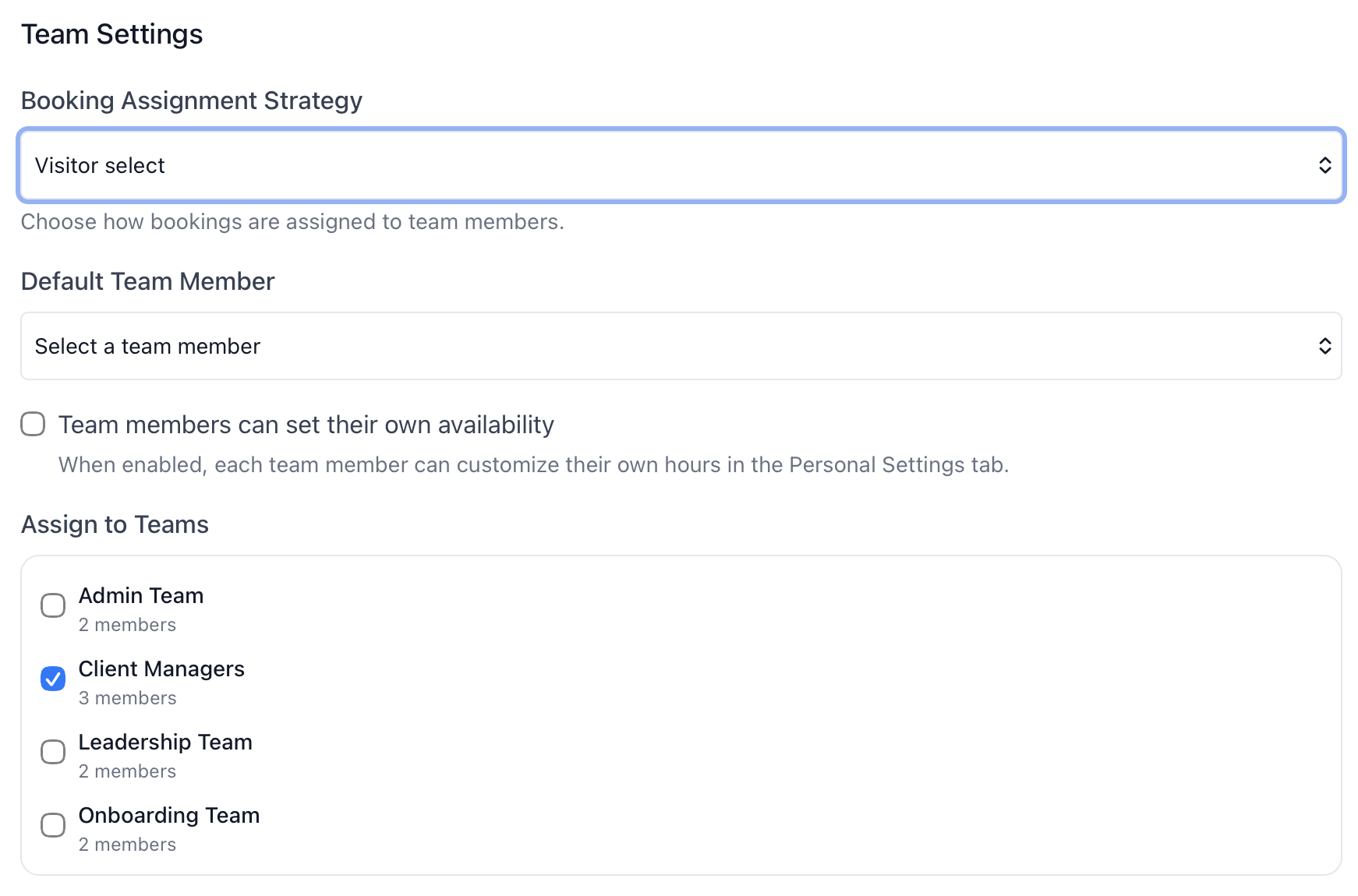
Change kickoff duration, form questions, or booking instructions once on a team event type instead of copying the same edit across every CSM profile.
Reporting without spreadsheets
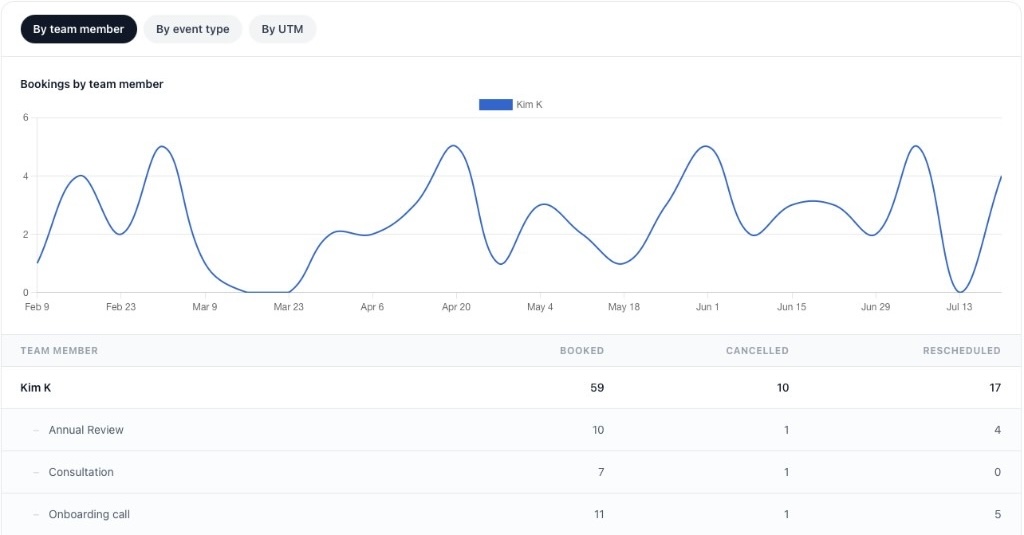
See onboarding volume, cancellations, and reschedule trends by CSM and meeting type — without checking calendars or rebuilding reports by hand.
Built for the person turning customer chaos into a CS process
If you are the first CS hire, Head of Customer Success, or founder-led CS owner, you probably do not need a heavy customer success platform yet. You need the customer meeting journey to be consistent, reportable, and easy to update as the team changes.
For first CS hires
Build a lightweight customer meeting system across kickoff, onboarding, training, adoption, feedback, and renewal — before buying a heavy CS operations stack.
For CS leads and admins
Keep booking pages consistent, find the right team links quickly, and report on customer call volume without spreadsheet projects or calendar archaeology.
For founders stepping back
Move routine customer calls out of the founder's calendar while keeping control over high-value, sensitive, or strategic conversations.
For growing CS teams
Standardise shared meeting types, route calls with round robin, and keep old links working when team members change role or leave.
Use cases
Customer success scheduling built for consistency and visibility
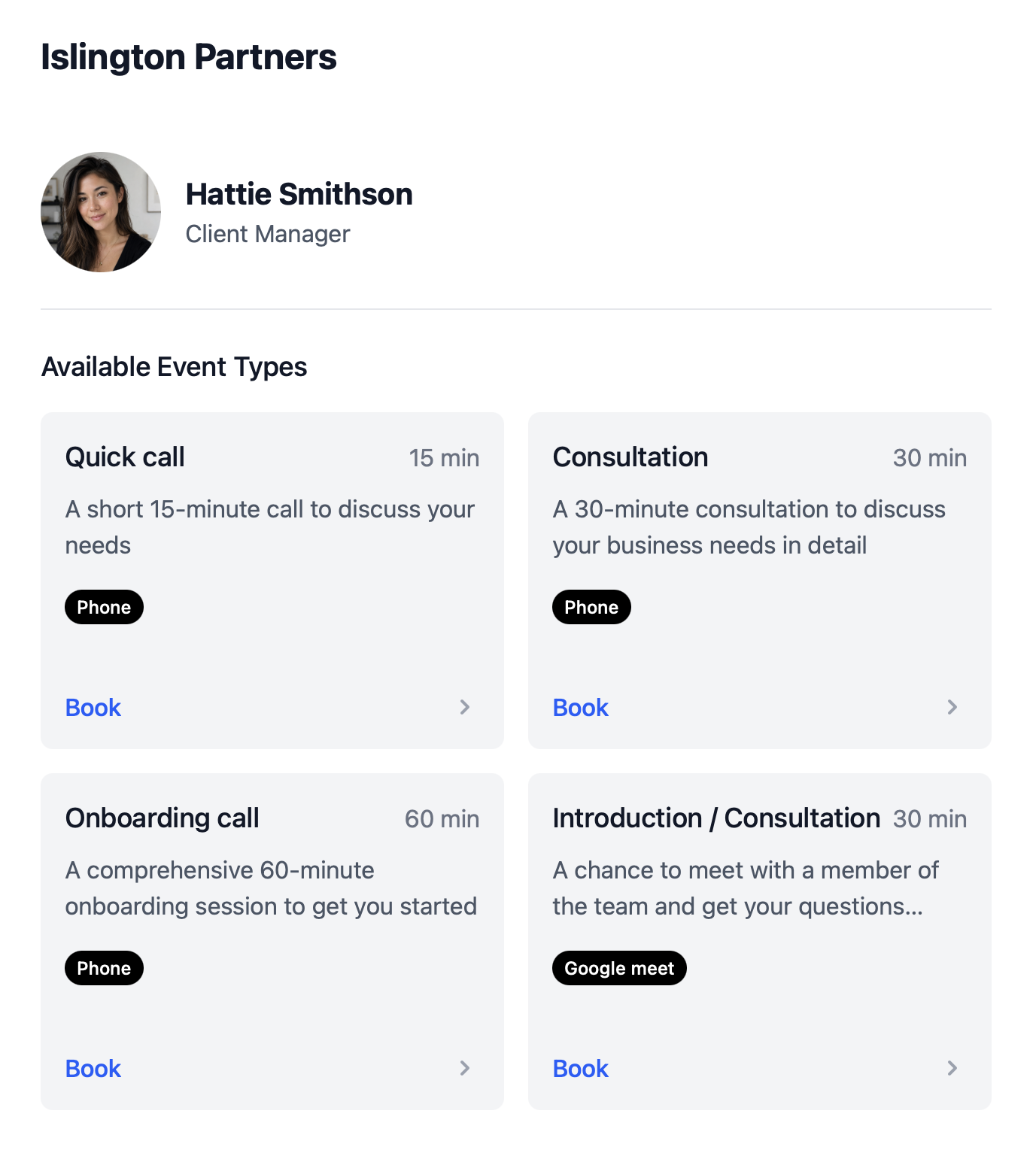
Customer success breaks down when every CSM uses a different link, context is collected on the call, handoffs need two calendars checked separately, and leaders rebuild meeting reports in spreadsheets. calendr.so helps CS teams manage the booking layer properly.
Team event types
Keep kickoff, training, and review booking consistent as the CS team grows
Instead of every CSM building their own version of onboarding or kickoff, CS leaders can create one team event type and connect it to the CSMs, implementation managers, and support people who should use it — keeping duration, form questions, and customer-facing language consistent.
- Update shared pages once.
- Build team-approved pages for kickoff, training, handoffs, and reviews from one central setup with team management instead of chasing individual CSM links.
- Find the right link fast.
- Use colleague search and the Everyone's event types view to copy the current booking link for a CSM, implementation manager, or meeting type — without asking in Slack or digging through old messages.
- Keep old links working.
- When links live in onboarding emails, playbooks, and lifecycle campaigns, fallback scheduling options help customers book another host when the original team member is no longer available.
Handoffs & kickoff
Sales-to-CS handoff, implementation handover, and customer kickoff calls
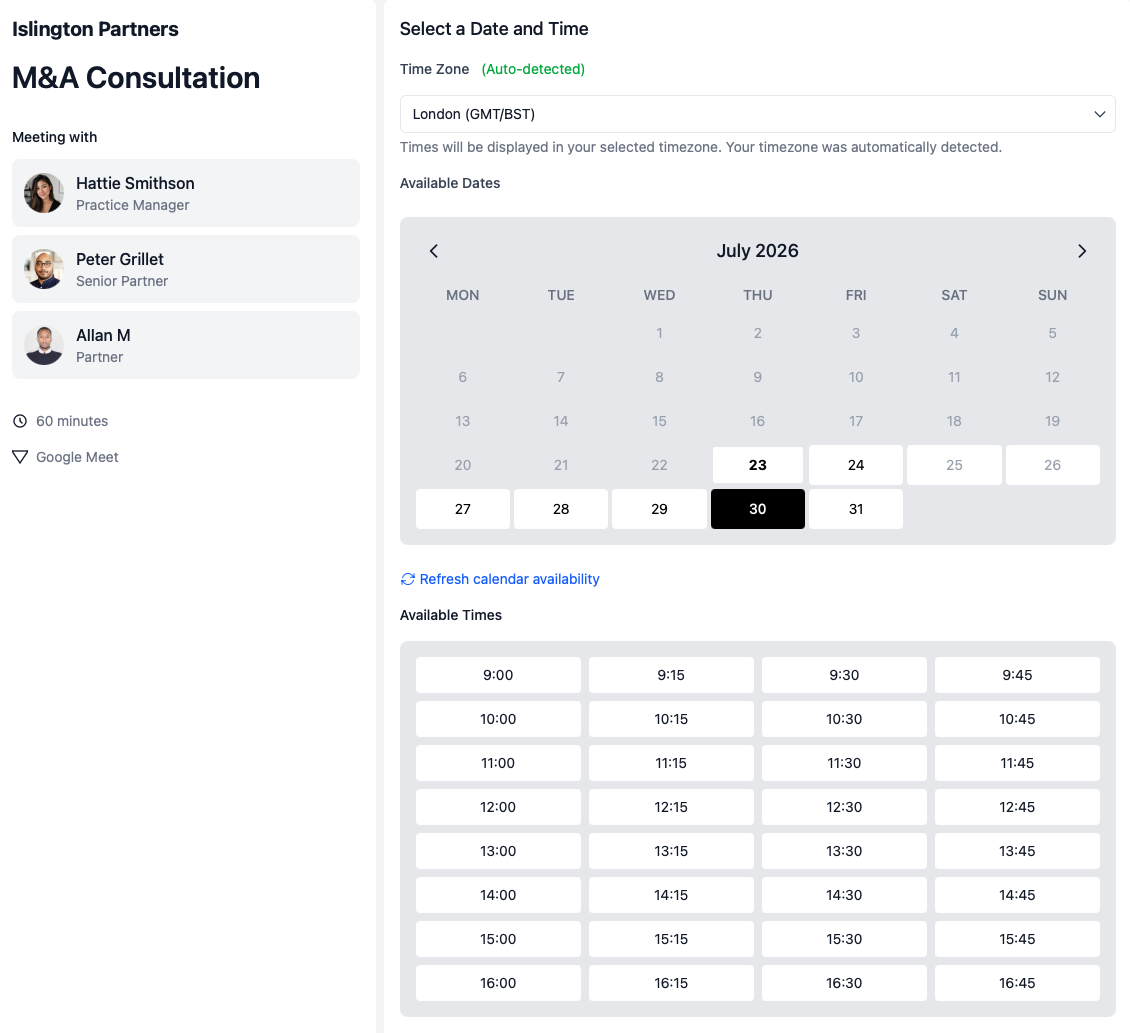
Create a clean handoff when a customer needs more context, the founder was involved in the sale, or implementation risk is already visible. Give new customers a clear first CS-owned meeting after close — with the right internal people on the call from the start.
- Include everyone who matters.
- Use multi-host booking when a handoff needs sales and CS, implementation and CS, or CS and a technical specialist on the same call.
- Set expectations early.
- Confirm goals, stakeholders, and next steps in a dedicated kickoff flow — not a generic calendar link.
- Connect to onboarding workflows.
- Pair handoff and kickoff flows with client onboarding scheduling as the journey gets clearer.
Onboarding & training
Onboarding, implementation, and training sessions
Use dedicated booking flows for setup, configuration, migration, and training when the customer cannot reach value until the basics are in place. Separate training from kickoff and support so each session matches what the customer actually needs.
- Collect context before the call.
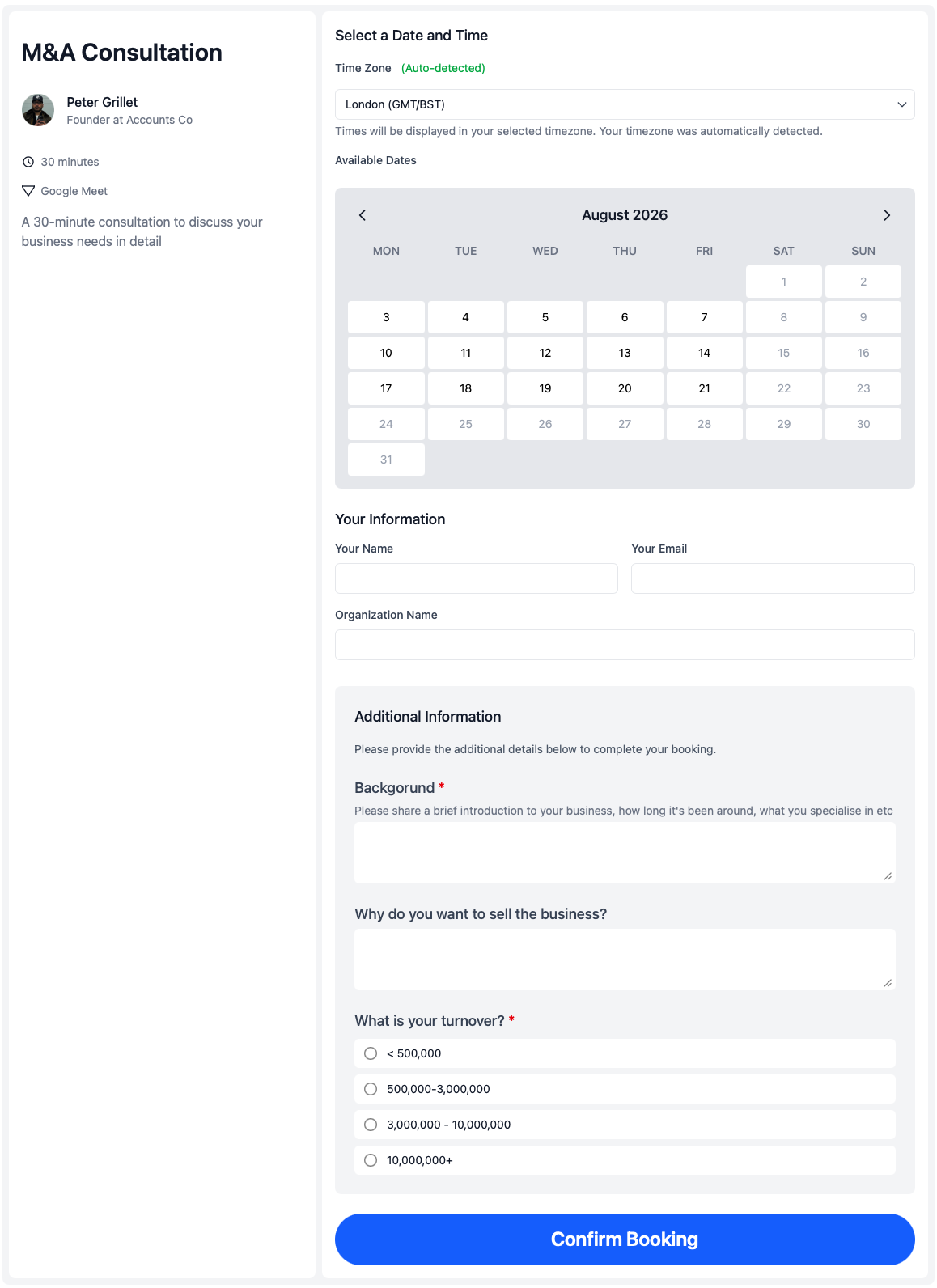
- Use booking forms to gather goals, stakeholders, timeline, and blockers before onboarding or training begins — so the first ten minutes are not spent on catch-up questions.
- Route by customer situation.
- Use qualifying forms when new customers, existing users, or at-risk accounts need different booking paths or prep questions.
- Bring the customer's team into the room.
- Let customers invite their whole team to the meeting while booking, instead of the CSM chasing additional attendees after the call is already on the calendar.
- Match duration to the work.
- Set different lengths and buffers for implementation calls, training sessions, and adoption check-ins.
Renewals & QBRs
QBRs, adoption check-ins, and renewal reviews
Create a clear meeting type for quarterly business reviews, adoption check-ins, and renewal conversations before the customer goes quiet or renewal pressure arrives.
- Give reviews their own booking flow.
- Create a dedicated page for client review scheduling, QBRs, and renewal conversations so customers can book the next check-in when the time is right — before renewal risk appears.
- Bring product in when needed.
- Include CS and product on feedback or escalation calls with shared availability checking.
- Use controlled links for risk calls.
- Send single-use booking pages for save conversations or founder-led escalations where a reusable link should not keep circulating.
Booking reports
See what your CS team is actually booking without spreadsheet workarounds
CS leaders often need simple answers that are surprisingly hard to get: how many onboarding calls were booked, which CSMs are carrying the most customer meetings, and whether cancellations are rising on a particular meeting type. Booking reports give you a direct view of the scheduling layer.
Summary metrics
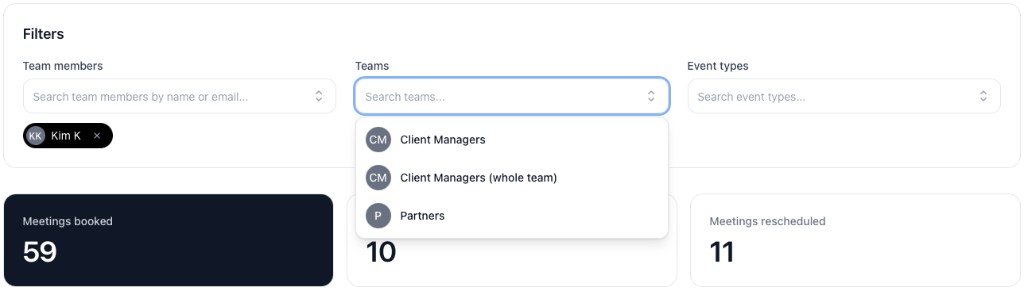
See meetings booked, cancelled, and rescheduled for the selected period before you dig into the breakdown.
By team member
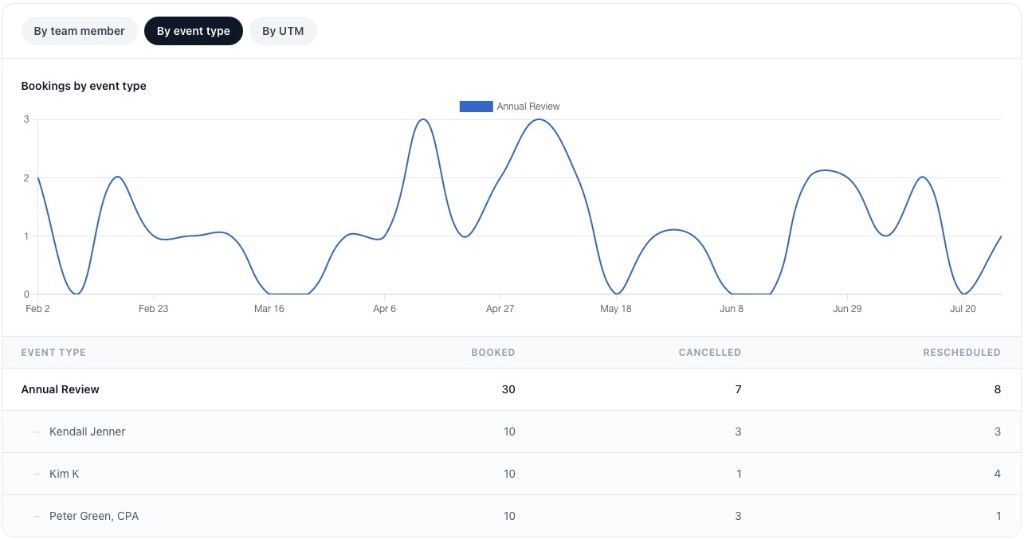
Review each CSM's booked, cancelled, and rescheduled totals with event types nested underneath — so you can see load and meeting mix at a glance.
By event type
Flip to event type view when the question is about kickoff, training, or review volume rather than individual calendars.
Export and saved views
Download CSV for leadership updates and save filter presets for the reports you check every week.
Filter by the people and meeting types that matter
Narrow reports by team members, teams, or event types to focus on onboarding volume, handoff activity, or one part of the CS function. Summary cards update as soon as you add or remove a filter.
Track customer meeting activity over time
Line charts show how booking volume changes across the selected period — useful when you want to spot reschedule trends, onboarding spikes, or uneven load across the team.
Booking flows for every stage of the customer journey
Kickoff, training, support, feedback, and renewal calls should not all use the same link. Each meeting has a different job — and calendr.so helps you create a booking flow for each one.
Sales-to-CS handoff calls
Create a clean handoff from sales to customer success when a customer needs more context, the founder was involved in the sale, or implementation risk is already visible.
Implementation-to-CS handover calls
Book the meeting when both the implementation manager and CSM need to attend, so ownership transfers cleanly and the customer does not repeat context twice.
Customer kickoff calls
Give new customers a clear first CS-owned meeting after close. Set expectations, confirm goals, identify stakeholders, and agree what happens next.
Onboarding and implementation calls
Use dedicated booking flows for setup, configuration, migration, integrations, permissions, or account structure when the customer cannot reach value until the basics are in place.
Training sessions
Separate training from kickoff and support. Collect role, team, and learning goals during booking so the session matches what the customer actually needs.
Adoption check-ins
Book structured check-ins after onboarding to see whether the customer is using the product, where they are stuck, and what needs to happen before silence turns into churn risk.
Product feedback calls
Bring CS and product into the same conversation when a customer has a workflow problem, feature request, or repeated blocker worth understanding properly.
Renewal and QBR reviews
Create a clear meeting type for quarterly business reviews, outcomes, adoption, open issues, expansion opportunities, and renewal risk before the conversation becomes urgent.
Save or risk calls
Use controlled one-off booking links for sensitive customer situations where the founder, product lead, or commercial owner may need to join quickly.
How to setup
How to get set up in less than 2 minutes 30 seconds
This short walkthrough shows how quickly a CS team can get calendr.so working for customer meetings.
In the video, you will see:
- How to create team event types for handoffs, kickoff, and onboarding
- How to add booking links to CRM tasks and lifecycle emails
- How to use booking forms, qualifying forms, and multi-host availability
- How to invite colleagues, set fallback options, and review booking reports
Team management
Keep booking pages consistent, findable, and reportable as the CS team grows
When there is one CS person, they can manage everything manually for a while. When there are two or three, inconsistency creeps in — different links, durations, buffers, and availability rules. calendr.so helps CS leaders standardise the booking layer with the same scheduling features growing customer teams rely on.
- Team event types
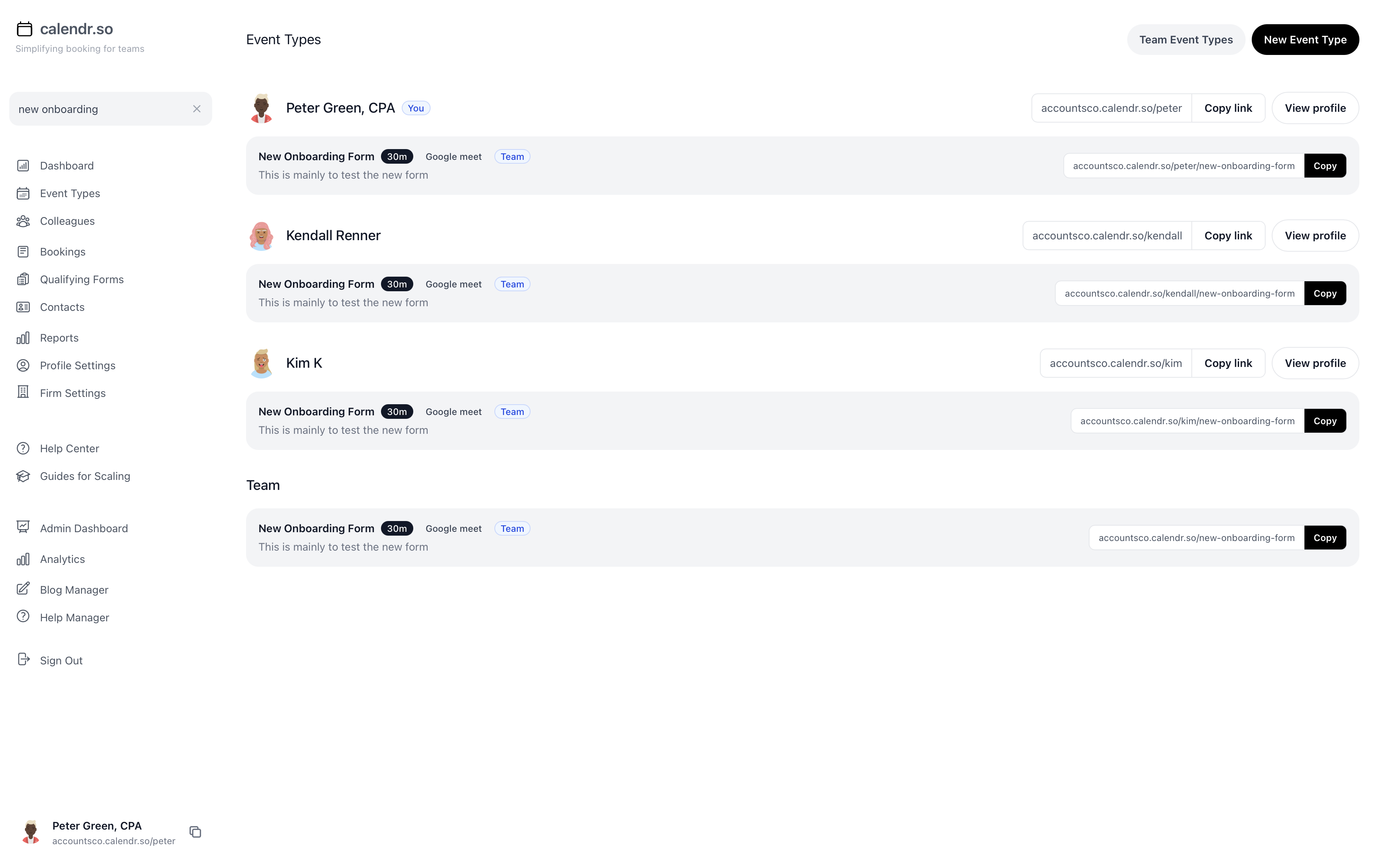
- Create firm-approved booking flows for kickoff, onboarding, training, check-ins, QBRs, and handoffs so every customer gets the same clear process — and one central update improves the experience for the whole team.
- Colleague search and Everyone's event types
- Find the right colleague or meeting type link and paste it into email or chat without relying on old bookmarks, previous messages, or asking around in Slack.
- Context before every call
- Use booking forms and qualifying forms to collect goals, blockers, roles, and handoff details before the meeting so CS does not walk in blind.
- Multi-host handoffs
- Let customers book sales-to-CS, implementation-to-CS, and escalation calls when every required internal person is available using multi-host booking.
- Round robin and fallback options
- Distribute onboarding and check-in calls with round robin scheduling and keep links in playbooks and lifecycle emails working when team members change.
- Booking reports
- Track meetings booked, cancelled, and rescheduled by team member and event type with booking reports — without exporting calendar data by hand.
Share this with the decision maker
Need a founder or head of CS to take a look?
CS leads often spot the scheduling problem before they own the buying decision. Use the button to open an email with a short note and a link to this page.
Share this pageCustomer success experience
Trusted by CS leaders, CSMs, and growing customer teams
From sales handoffs and kickoff calls to onboarding, QBRs, team event types, and booking reports — customer success teams use calendr.so to keep client meetings structured without adding another platform.
"calendr.so makes it easy for customers to book with the right CSM or sales person — round robin and shared team pages mean handovers happen without chasing links or waiting on replies."

"Standardising our meeting types and having booking reports in one place has dramatically saved time. We spend less time coordinating calendars and more time in conversations that matter."

"We rolled calendr.so out quickly — Google Calendar sync, team booking pages, and multi-host meetings worked out of the box without a heavy IT project or custom integration."

"Booking reports give me a firm-wide view of what is actually being scheduled — by person and meeting type — without exporting calendars. That's the oversight a growing team needs."

"Booking forms on our consultation pages collect the briefing details we need before a call — clients book in one step and our team shows up prepared instead of spending the first ten minutes on basics."


Frequently asked questions
- Is calendr.so a customer success platform?
- No. calendr.so is not a full customer success platform. It helps you manage the booking layer around customer success: handoffs, kickoff calls, onboarding, training, check-ins, feedback, renewals, and risk meetings — without buying a heavy CS operations stack.
- Can we use calendr.so before we have a mature CS process?
- Yes. calendr.so is useful when you are still defining the process because it lets you start with simple meeting types and improve them as your customer journey becomes clearer.
- Can we update onboarding or kickoff booking pages centrally?
- Yes. Team event types let CS leaders create one firm-approved booking page for kickoff, training, handoffs, or reviews and connect it to the CSMs who should use it. When duration, form questions, or instructions change, you update the shared event type once instead of chasing individual links.
- Can CS leaders see how many customer meetings were booked, cancelled, or rescheduled?
- Yes. Booking reports show meetings booked, cancelled, and rescheduled by team member and event type, with filters, charts, CSV export, and saved views — so leaders do not have to rebuild the numbers in spreadsheets.
- What happens when a CSM leaves but their link is still in emails or playbooks?
- Fallback scheduling options help keep customer booking links working when the primary host is archived, unavailable, or no longer responsible for that meeting type. Customers see alternative hosts instead of hitting a dead end.
- How do we find the right colleague's booking link quickly?
- Colleague search and the Everyone's event types view let CSMs, support people, and admins search for the right team member or meeting type, copy the current booking link, and paste it into email, Slack, or customer messages without asking around.
- Can we include more than one internal person on a booking page?
- Yes. Multi-host booking lets customers choose times that work for everyone required on the call, such as sales and CS, implementation and CS, CS and a technical specialist, or CS and product.
- Can we create one-off links for specific customer situations?
- Yes. Single-use booking pages are useful for sensitive handoffs, escalation calls, high-priority onboarding, or renewal-risk conversations where you do not want a reusable link floating around.
- What customer meetings should we set up first?
- Start with sales-to-CS handoff, customer kickoff, training, adoption check-in, and renewal or success review. Add implementation-to-CS handover, product feedback, support escalation, and risk calls when the need becomes clear.
- Does calendr.so help reduce founder involvement?
- Yes. By defining which customer meetings CS owns and when the founder needs to join, calendr.so helps move routine calls out of the founder's calendar without losing control over important customer moments.
Build a customer meeting journey your CS team can run, update, and report on
Create consistent booking workflows for handoffs, kickoff calls, onboarding, training, check-ins, and renewals — with team event types, fallback options, and booking reports — without adding a heavy CS platform.
No credit card required
Blog
Still building your customer success process?
If you are mapping your first CS process, these guides will help you decide which customer meetings should exist and how to turn them into repeatable workflows.

Why Customer Success Teams Need More Than a Basic Booking Link
A basic booking link works until customer success becomes a team process. This post shows how calendr.so helps CS leaders reduce the admin of keeping booking pages consistent, collect better context before calls, manage handoffs across multiple hosts, and get reporting on bookings, cancellations, and reschedules without building spreadsheet reports by hand.
05 Aug 2026

The Sales-to-Customer Success Handoff (Scheduling Guide)
A sales-to-customer success handoff breaks when the next meeting is unclear, the right people are missing, or the context from the sale never reaches the onboarding team. This guide explains how to use scheduling to create a cleaner handoff between sales and CS, so customers move from signed deal to first value with less friction.
17 Jul 2026

Where Sales Ends, Customer Success Starts, and Support Fits In
In small startups, sales, customer success, and support often blur together until nobody is sure who owns the customer after the deal closes. This article explains the difference between the three roles, why customer success is still a commercial function, and how clearer meeting types can stop every customer call turning into support.
26 Jun 2026

Appointment Scheduling Software for Client-Facing Teams: A Calendr.so Overview
If your team books sales calls, onboarding sessions, support reviews, legal appointments, or client consultations, a basic booking link can start to create more admin than it removes. This video walkthrough shows how calendr.so helps client-facing teams control meeting types, find the right colleague's link, coordinate multi-person meetings, and report on booking activity without turning scheduling into another spreadsheet.
12 Aug 2026

How to Sign Up for calendr.so in Under 3 Minutes
If you are wondering how much setup calendr.so needs before someone can book a meeting with you, the short answer is: not much. This video shows the full signup flow, from creating a free trial to sharing a live booking link, in about two and a half minutes.
09 Jul 2026

Why a Calendr booking link beats email back-and-forth (and AI scheduling bots)
Email scheduling is slow, error-prone, and hard to scale across teams. A Calendr booking link gives clients a faster path to book while keeping your team’s availability, meeting rules, and timezone handling accurate.
23 Jun 2026