

Karbon integration
Karbon integration that sends booking data where your firm already works
Karbon integration lets accounting firms collect client details on booking forms and push them into Karbon contacts, organisations, work items, and timeline notes — so discovery calls and onboarding meetings do not end with manual rekeying.
The operating problem
Booking tools and practice management should not be separate data entry steps
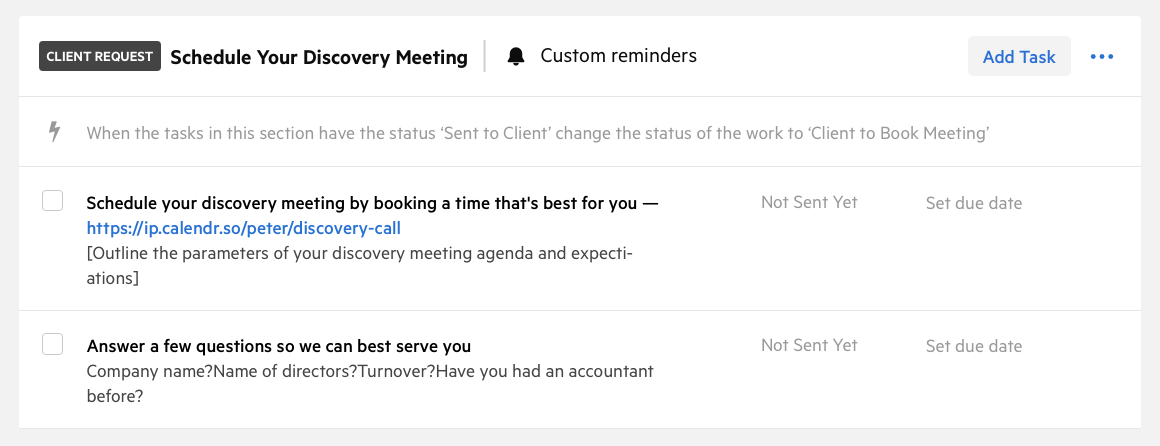
Most firms already run client work in Karbon. The friction starts after a prospect books: someone copies names, entity details, and registration numbers from a form or email into Karbon, creates the job manually, and writes a note so the rest of the team knows what was discussed.
That work is easy to defer, which means discovery calls arrive in Karbon late, incomplete, or not at all. The Karbon integration keeps intake inside the booking flow your clients already use, while appointment scheduling for accountants stays focused on availability, branding, and team routing.
How it works
Configure once per meeting type, then sync every confirmed booking
Connect Karbon at firm level, then choose what each event type sends into Karbon when someone books. Different meeting types can create different jobs, contact types, and intake questions.
Connect Karbon once
Add API credentials, test the connection, and import contacts and work templates from Karbon into calendr.so.
Map fields per event type
Choose Karbon person and organisation fields to collect on the booking form, including accounting details and custom fields.
Create jobs automatically
Attach a Karbon work template so confirmed bookings can create jobs with start dates, due dates, and status already set.
Add timeline notes
Every booking adds a formatted note to the contact, organisation, and work item timelines with booking and form details.
Client-facing intake
Collect Karbon-ready details while the client is booking
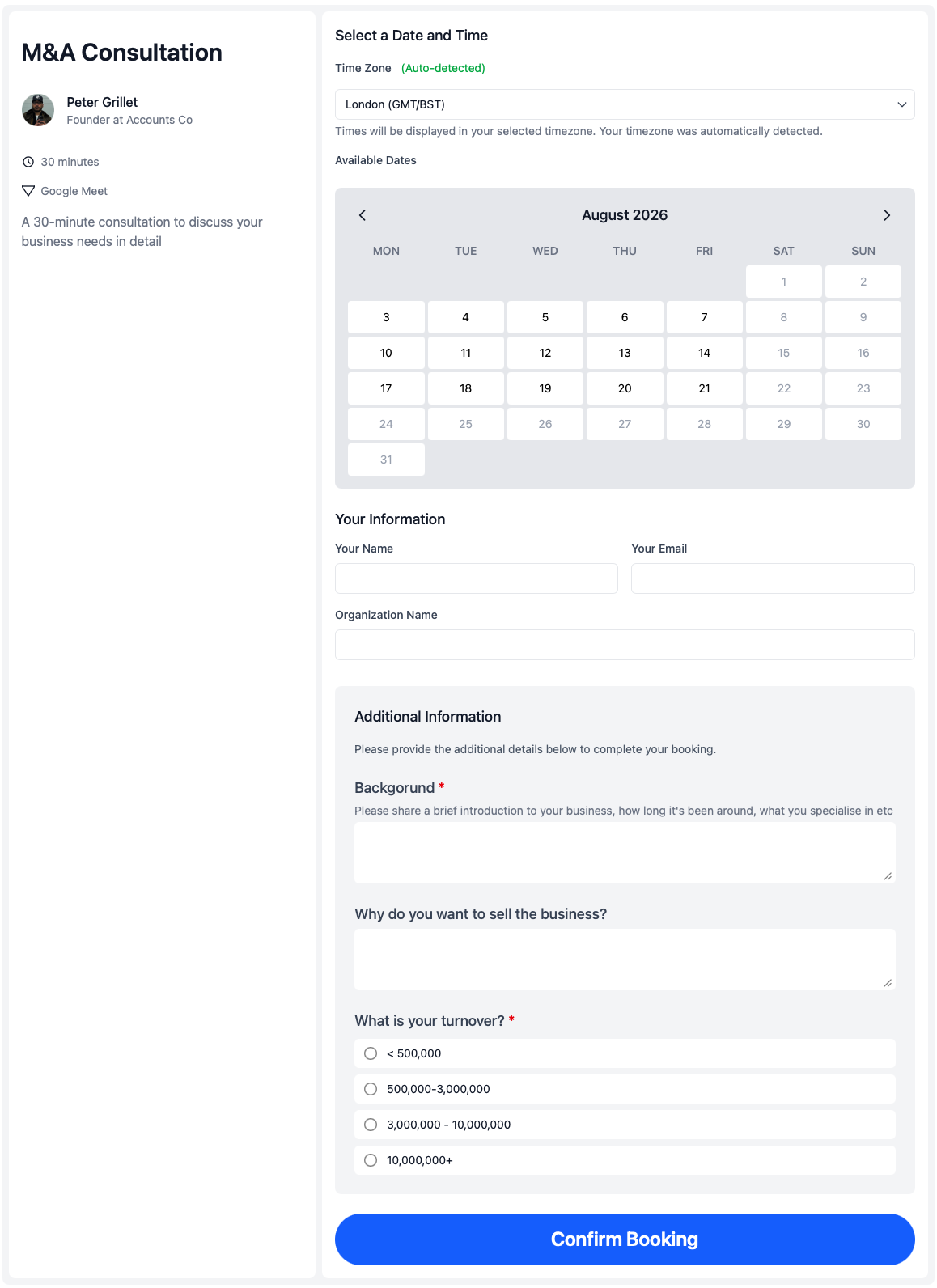
Selected Karbon fields appear on the public booking page under Additional Information. Clients answer once; calendr.so writes the answers to the matching Karbon contact or organisation when the booking syncs.
Pair mapped Karbon fields with booking forms when you also need Calendr-only questions. Custom form answers stay in the timeline note, while mapped fields update the Karbon record directly.
What syncs
Where accounting firms use Karbon sync in calendr.so
Discovery and new business
Route inbound enquiries through a branded booking page, set Prospect contact types, and create an enquiry work item when the call is confirmed. Qualifying forms can run the same Karbon mapping before someone reaches the booking step.
Onboarding and entity setup
Collect legal name, entity type, registration numbers, and financial year end during onboarding bookings. Additional attendees on the booking can be added as Karbon contacts linked to the organisation.
Tax season and review meetings
Appointment scheduling for tax preparers often needs context before the meeting starts. Use intake fields for the details that belong on the Karbon record, and let the timeline note carry the rest of the booking summary.
Works with calendr.so
Practice-management sync inside a broader scheduling workflow
Karbon integration sits alongside the scheduling features firms already use in calendr.so. Team management helps practice managers roll out consistent booking pages, while branded booking pages keep discovery and review links looking like they came from the firm.
When partners need more than one person in the meeting, multi-host booking and round robin scheduling still handle availability — Karbon sync runs after the booking is confirmed. Firms that want clients to choose phone, video, or in-office meetings can combine the integration with meeting location options on the same booking page.
See the full integrations overview for calendar and video connections, or explore the features overview for the rest of the scheduling system.
Getting started
Step-by-step guides in the help centre
Follow these guides to connect Karbon, configure event types, and verify booking data is syncing correctly.
Connect Karbon to Calendr
Create API credentials in Karbon, connect your firm in calendr.so, import contacts, and refresh work templates before you go live.
Read the setup guide →
Push booking data into Karbon
Configure contact types, work item templates, and intake fields on each event type so confirmed bookings sync to the right Karbon records.
Read the event type guide →
Frequently asked questions
- What does the Karbon integration do in calendr.so?
- The Karbon integration connects your booking pages and qualifying forms to Karbon. When someone books or submits a form, calendr.so can create or update Karbon contacts and organisations, apply contact types, update mapped fields, create work items from templates, and add a timeline note with booking details.
- Which booking data can be sent into Karbon?
- You choose which Karbon person and organisation fields to collect on each event type. Answers can sync to native Karbon fields, accounting details, registration numbers, and custom fields. Booking details and custom form answers are included in the Karbon timeline note.
- Can calendr.so create Karbon jobs from a booking?
- Yes. Each event type or qualifying form can use a Karbon work template to create a job when someone books or submits the form. You can set the start date, due date, and initial status, and the job is assigned to the booking host where possible.
- What happens if the client is not already in Karbon?
- calendr.so matches existing Karbon contacts by email and organisations by name. If no match exists, it creates the contact and organisation in Karbon, then syncs the mapped field answers and booking note.
- Does Karbon data sync back into calendr.so?
- Yes. When you connect Karbon, calendr.so imports contacts and organisations and keeps name and email details updated through Karbon webhooks. Field-level intake sync runs from calendr.so into Karbon when bookings are confirmed.
- How do accounting firms set up the Karbon integration?
- A firm admin adds Karbon API credentials in calendr.so integrations, tests the connection, and runs contact sync. Then each event type can be configured with contact types, work templates, and the Karbon fields to collect on the booking form.
Accounting firm experience
Trusted by partners, practice managers, and firm advisors
Accounting firms use calendr.so to standardise client booking and reduce the admin work that follows every discovery call, onboarding meeting, and review appointment.
"You don't need to be technical to get calendr.so working. We had booking pages set up and shared with the team quickly — without IT or a long implementation project."

Sharon De'Athe, CPA, CGA
Partner at WL Buck
"I recommend calendr.so to firms I implement because team event types make it easy to roll out standard onboarding and consultation pages — practice managers set them up once and share them across the team."

"Team event types let us standardise client consultation and review meetings across the firm — so partners and managers share the same professional booking experience without everyone maintaining their own links."

"Booking reports give me a firm-wide view of what is actually being scheduled — by person and meeting type — without exporting calendars. That's the oversight a growing team needs."

"Booking forms on our consultation pages collect the briefing details we need before a call — clients book in one step and our team shows up prepared instead of spending the first ten minutes on basics."


Connect booking intake to Karbon
Start your 14-day free trial and send discovery, onboarding, and review bookings into Karbon without rekeying client details.
No credit card required