

Appointment reminders
Appointment reminders that send email notifications before every meeting
Appointment reminder software in calendr.so sends customizable email notifications before client meetings, so attendees get the time, location, and prep details they need without your team chasing confirmations manually.
The operating problem
Why appointment reminder software matters after the booking is confirmed
Getting the appointment on the calendar is only half the job. Clients forget, inboxes bury the confirmation, and front-desk teams end up sending the same reminder email again and again before consultations, reviews, demos, and service appointments.
Manual follow-up does not scale, and a generic calendar invite rarely gives people everything they need before they arrive. A scheduling app with reminders should send the right reminder email automatically, using the meeting details already captured in the booking flow.
How it works
Set reminder emails once on each booking page
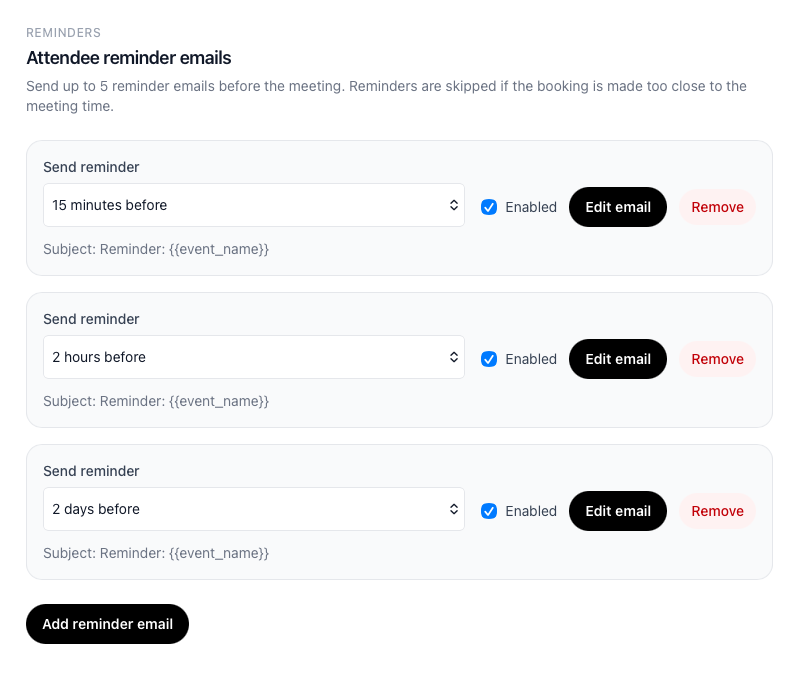
calendr.so lets you send reminders per event type, choose when each reminder email goes out, and customize the message clients receive before the appointment.
Up to five reminder emails
Send reminders at more than one point before the meeting, such as one week out and again on the day itself.
Flexible send timing
Choose when to send reminders from 15 minutes to one week before the appointment starts.
Custom reminder templates
Edit the subject and body for each reminder email, including links to prep guides or resources your clients should read first.
Useful meeting placeholders
Pull in attendee name, start time, location, video link, and reschedule or cancel links automatically.
Use cases
Where teams send reminders without rebuilding the booking process
Dental and patient-facing appointments
Dental practices and other appointment-based teams can send reminder emails with the right time and location details before a patient visit, without staff copying details into separate tools.
Small business and service bookings
Small businesses use reminder emails to reduce no-shows on consultations, classes, and client sessions — especially when paired with clear availability management and booking-window rules.
Professional services and reviews
Appointment scheduling for accountants and other client-facing firms can remind clients what to bring before a review, while meeting location options keep phone, video, and in-person details in the same reminder flow.
Works with calendr.so
Reminders support the booking process — they do not replace it
Reminder emails work best when the meeting was booked correctly in the first place. Pair them with booking forms when you need intake details before the appointment, and with branded booking pages when clients should receive reminders that match your firm's presentation.
If your team is trying to reduce missed appointments, start with the process behind the booking link — routing, preparation, and realistic availability — then use reminders as the support layer. Our guide to appointment scheduling best practices explains that order of operations in more detail.
See how appointment reminders fit alongside other confirmed capabilities on the features overview, or explore online appointment scheduling from the main calendr.so homepage when you are setting up booking pages for the first time.
Frequently asked questions
- Does calendr.so send SMS appointment reminders?
- No. calendr.so sends email reminder notifications only. You can customize reminder emails per booking page, but SMS reminders are not supported.
- How many reminder emails can I send before a meeting?
- Each booking page can send up to five reminder emails before the meeting starts, so you can combine a same-day nudge with an earlier reminder when the appointment was booked well in advance.
- When can reminder emails be sent?
- You can schedule reminders from 15 minutes up to one week before the meeting, including options such as 1 hour, 24 hours, 2 days, and 3 days before the start time.
- Can I customize the reminder email subject and body?
- Yes. Each reminder email can use a custom subject and body, with placeholders for attendee name, meeting time, location, video link, and reschedule or cancel links.
- What happens if someone books too close to the meeting time?
- If a booking is made after a reminder would already have been sent, calendr.so skips that reminder instead of sending a late or confusing email.
- Do reminders work with other calendr.so scheduling features?
- Yes. Reminder emails work alongside booking forms, availability controls, meeting location options, branded booking pages, and team event types when those settings are part of the same booking flow.
Client booking experience
Trusted by teams that need clients to show up prepared
From health and wellness practices to professional services and growing client-facing businesses — teams use calendr.so to keep booking simple and follow-up automatic.
"Our clients and our team both love it — it saves time in the booking process and gets rid of the back-and-forth."

"I embed calendr.so booking links straight into landing pages and outreach — prospects pick a time without email ping-pong, and I keep control of when I'm actually available."

"You don't need to be technical to get calendr.so working. We had booking pages set up and shared with the team quickly — without IT or a long implementation project."

Sharon De'Athe, CPA, CGA
Partner at WL Buck
"Standardising our meeting types and having booking reports in one place has dramatically saved time. We spend less time coordinating calendars and more time in conversations that matter."

"I've installed calendr.so with several sales teams because it's easy to deploy, and the reporting gives marketing real visibility into which campaigns are turning into booked meetings."


Send reminder emails before every client appointment
Configure attendee reminder emails on your booking pages so clients get the time, location, and prep details they need before the meeting starts.
No credit card required