

For small businesses
Booking Software for Small Business Teams That Need a Customer-Facing Online System
Booking software should do more than send customers to a generic calendar link. For a small business, it should offer a clear reservation page, live availability, simple confirmation, and a professional experience from the first click.
calendr.so helps service businesses, consultants, and growing teams launch embeddable booking, booking forms, round robin routing, and booking reports — with appointment scheduling software for the wider team workflow behind it.
What is booking software for small business?
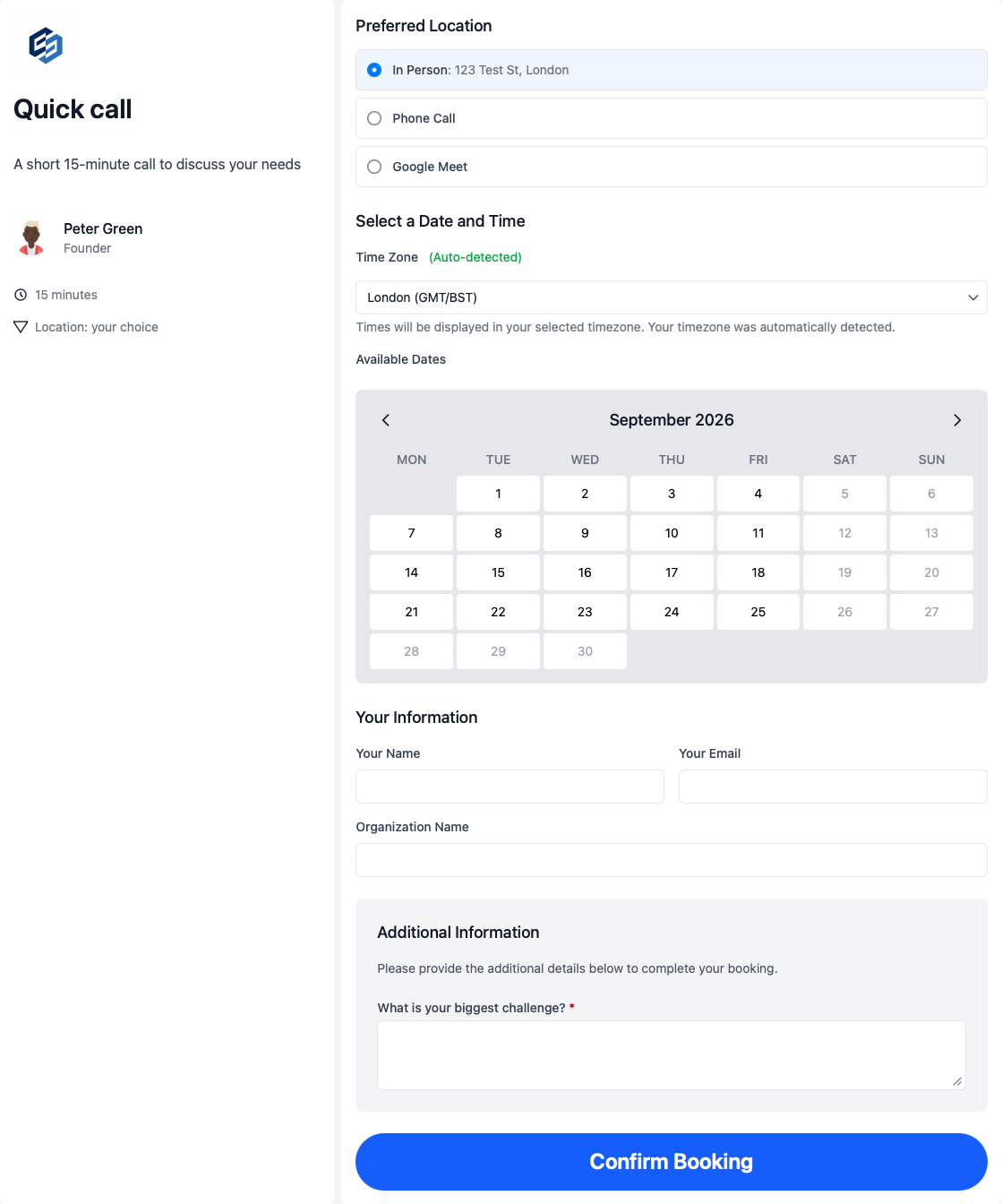
Booking software for small business helps customers reserve appointments, consultations, sessions, or service time online — through a standalone page or an embedded flow on your website.
That is different from internal appointment scheduling alone. Booking software focuses on the customer-facing reservation experience: branded pages, live availability, intake before booking, and confirmation without waiting for a reply. Behind that, appointment scheduling software for small business covers team routing, availability controls, multi-host meetings, and reporting as the business grows.
When manual booking stops working for small businesses
Phone tag, DMs, and “what times work for you?” emails feel flexible at first. They usually break once booking volume, staff, and customer expectations all increase.
- — Customers wait for a reply while interest drops
- — Every reservation request lands on one person
- — The booking experience feels inconsistent across staff
- — Website visitors cannot book without leaving to email or call
- — Teams chase intake details after the reservation is confirmed
- — Owners cannot see which booking pages drive reservations
calendr.so helps you launch a customer-facing online booking system without building scheduling software from scratch — then add team scheduling as reservations grow.
Customer experience
Booking software focused on how customers reserve time
When someone searches for booking software for small business, they usually mean the customer-facing side of scheduling: a clear page, available times, simple confirmation, and a process that feels professional from the first click.
calendr.so helps you build online booking software for small business workflows where clients, prospects, and attendees need to self-serve — whether that is a consultation page, a service booking flow on your website, or a reservation step after someone shows interest in an offer.
Reservation workflows
How small businesses set up online booking customers can trust
Each workflow below covers a common customer-facing booking problem and the calendr.so feature that supports it.
Online service reservations
- What breaks manually
- Customers call, email, or message to find a time while you compare calendars manually.
- Calendr feature
- Branded booking pages with live availability
Website and campaign booking
- What breaks manually
- Interested visitors leave your site to request an appointment elsewhere.
- Calendr feature
- Embeddable booking pages
Intake before the reservation
- What breaks manually
- Staff chase basic details after the booking is already confirmed.
- Calendr feature
- Booking forms
Multi-person service appointments
- What breaks manually
- Customers wait while you check more than one team member's calendar.
- Calendr feature
- Multi-host booking
Fair routing as the team grows
- What breaks manually
- Every reservation lands on the owner or one shared inbox.
- Calendr feature
- Round robin scheduling and fallback options
Reservation reporting
- What breaks manually
- Owners cannot see which pages or staff drive bookings and cancellations.
- Calendr feature
- Booking reports
For owners
Track reservations, not just calendar entries
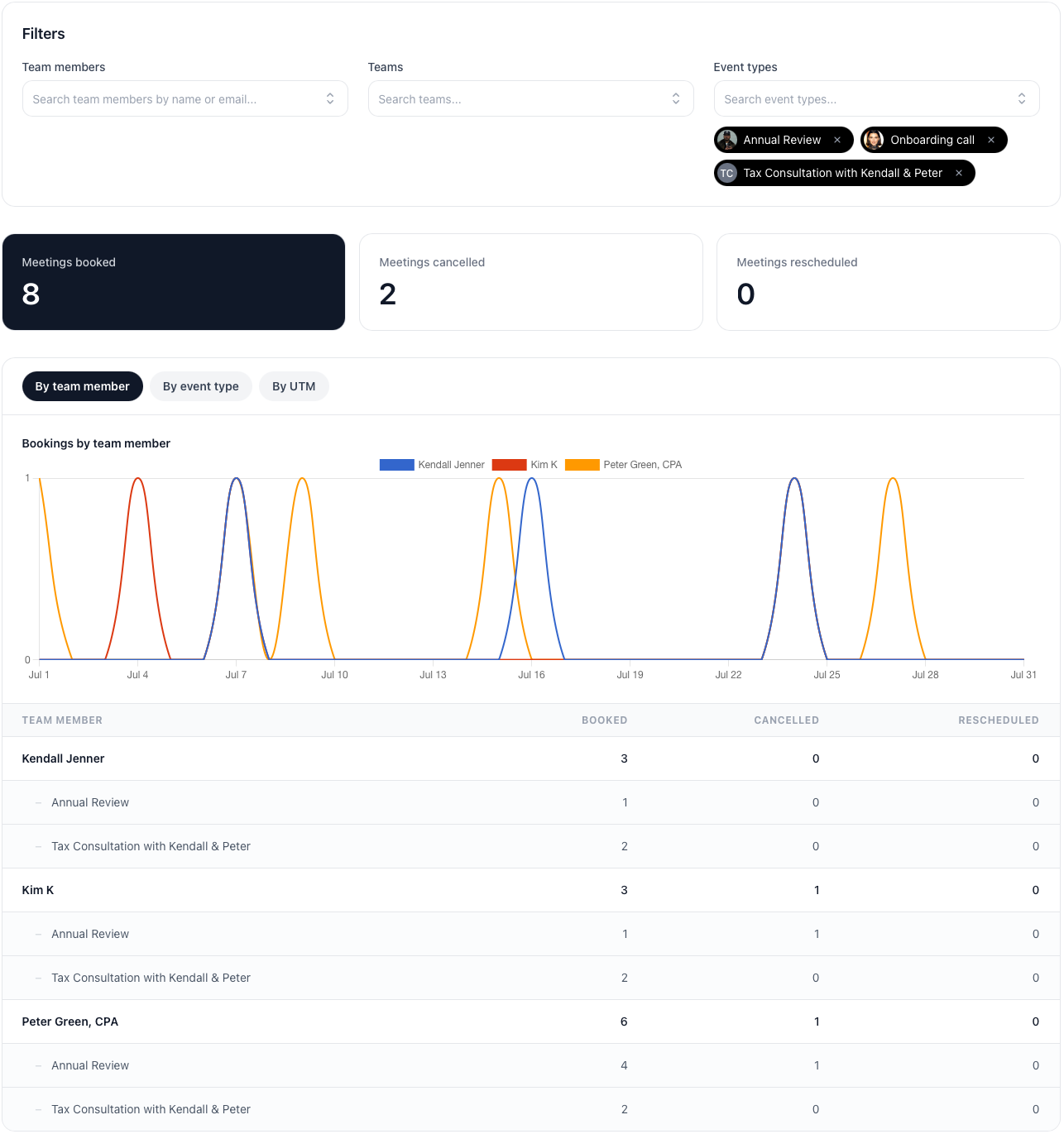
Once online booking is live, owners want to know which pages are generating reservations, which team members are getting booked, and whether cancellations are rising.
Booking reports filter by booking page and team member so you can see what is working without exporting calendars by hand.
Put booking where customers already are
Small businesses win when booking feels effortless. That might mean a standalone booking page for consultations, an embedded flow on a service page, or a reservation step added after someone shows interest in an offer.
Use embeddable booking pages on high-intent pages, booking forms when intake matters, and service business scheduling when the workflow spans more than one appointment type.
Frequently asked questions
- What is booking software for small business?
- Booking software for small business helps customers reserve time online through a clear booking page or embedded flow — without phone tag, email back-and-forth, or manual calendar checks. For one service provider, that might mean one polished reservation page. For a growing team, it usually needs embeddable booking, intake forms, live availability, team routing, and reporting.
- How is booking software different from appointment scheduling software?
- Booking software focuses on the customer-facing reservation experience: branded pages, live availability, embeddable flows, and simple confirmation. Appointment scheduling software covers the wider team workflow behind that — routing, availability controls, multi-host meetings, and reporting as staff and appointment types grow. Many small businesses need both.
- Can customers book directly from our website?
- Yes. Embeddable booking pages let clients and prospects reserve time from service pages, contact pages, landing pages, and campaign pages without leaving the journey they are already on.
- Can we collect details before a booking is confirmed?
- Yes. Booking forms gather the context your team needs before the reservation is confirmed, so every appointment arrives with useful information.
- Can booking software route reservations across team members?
- Yes. Round robin scheduling distributes bookings across available staff, and fallback options help keep reservation pages working when team members change.
- Can we start with one booking page and expand later?
- Yes. Most small businesses launch one consultation or service booking page first, then add more reservation types, embeddable flows, and team routing as demand grows.
- Can small business owners see which booking pages are working?
- Yes. Booking reports show reservations booked, cancelled, and rescheduled by team member and booking page, with filters and export when you need a clearer view of demand.
Launch a better booking experience
Create an online booking system customers can use immediately, then expand into team routing and reporting as your business grows.
No credit card required